



12th January 2026:
I’m Ashley, and I am an AI skeptic.
Ever since the AI boom was kicked off by the launch of ChatGPT, it’s been hard to avoid people online claiming AI would either take your job or automate large swathes of it - often the bits that are the most fun.
By trade, I’m a Power BI developer turned Analytics Engineer, and I’ve repeatedly watched the latest and greatest new AI models mangling DAX queries, producing graphs that would make even the most junior developer cringe, or just flat out failing to understand why our semantic models and reports are built the way they are. During that time, I’ve sat around feeling that AI isn’t relevant to me. That its outputs can’t compete with what a skilled developer can do. Ultimately, I felt like my job was safe from the threat of AI, and so I began to ignore it.
What I didn’t notice though, was that with each iteration, the LLMs were improving. And more importantly, the tools around them that allow us to interact with them were developing too.
For me, the turning point came when Simon gave the first internal demo of our new Engineering platform, LakeForge and showcased AA’s approach to agentic development, Pantheon. It made me reevaluate what AI could do for me. Off the back of this internal launch, Simon held an internal hackathon. The aim was to use GitHub Copilot to build out a tool that would help solve one of our business problems or fix a problem we encounter in our working lives.
On a personal note, I am deeply competitive and so I decided now was the time to try and fix my biggest grievance with Power BI report development.
The problem that inspired me
As a department, AA’s Analytics team have long been conflicted over how, or even whether, to use wireframing in our report development process. I firmly land in the pro wireframing camp but I do sympathise with some of the arguments of our contingent of wireframe doubters!
I have often found myself in dismay at how complex some members of the wider community make their wireframing process, with more people than ever using Figma or other hardcore design tools. For me they miss the purpose of the wireframe; a wireframe should enable you to engage with your stakeholders early and align on vision for the product quickly. It should help you work out what questions the report will answer and how.
I usually use post-it notes on a virtual whiteboard, pen and paper, or a PowerPoint slide. I can then ask the user to take it away and refine it themselves if they want, before resharing it back to me for implementation. It works well enough, but every minute I spend replicating wireframes manually, feels like duplication of effort.
This led me to the problem I wanted to solve with AI:
"How can you take a wireframe a business user has made or refined themselves and quickly convert it into a Power BI report?"
Thanks to the wireframe the business user helped create, we all know what the final report needs to look like & what fields go where.
"Why can’t I just click a button and it magically turn my wireframe into an actual Power BI report?"
When the first previews of the enhanced PBIR format for visuals in Power BI came out I thought we finally had everything we needed to do exactly that! It felt technically possible. An app, that a non-technical user could use to iteratively designing a wireframe, without having to understand the nuances of building an actual Power BI report. That would then output to a Power BI project file-folder for an actual Power BI developer to refine and finish it off.
Months passed and nothing. I even gave it a first crack before realising I didn’t have the existing coding capability to do it myself without investing months of time I didn’t have learning a new language.
So the time came to figure out a solution for the hackathon.
Is a solution feasible?
We now had a viable plan: have a user upload the outputs of their requirements gathering, connect to a semantic model and then talk to a series of specialist agents to build a wireframe. We would then get another agent to quality assure it. After that we would map semantic model fields into it and convert it into a standard, simpler than PBIR, JSON format. If I could then solve the technical challenge of output to PBIR then we had an end-to-end solution.
The biggest remaining problem, we only had two and half weeks to build a working prototype, with no “smoke and mirrors”! Is it even technically possible? Are we going to finish it in time? Who knows! We certainly didn’t, but why not give it a shot?
29th January 2026:
Enter The Report Smith
I am writing this section of this blog on a train to Manchester, on the way to our yearly company kick-off where we will present our prototype for the first time. The fact that I’m not using the final hours to build and I am instead writing this blog probably tells you where we got to! If not, spoiler alert: it works! The Report Smith lives! So here is a short summary of what it does.
The Report Smith is a python based, streamlit app that can create the shell of a Power BI thin reports (reports that are live connect to existing semantic models) in minutes.
The app launches to a page that lets the user input a report name and choose output directory. The user then authenticates to Power BI service & then uses the UI to select the semantic model they want to connect to. The app is recovering this by using the user’s permissions to call the Power BI APIs for workspaces and then datasets in that workspace. Selecting a semantic model initialises a blank PBIP report connected to that model.
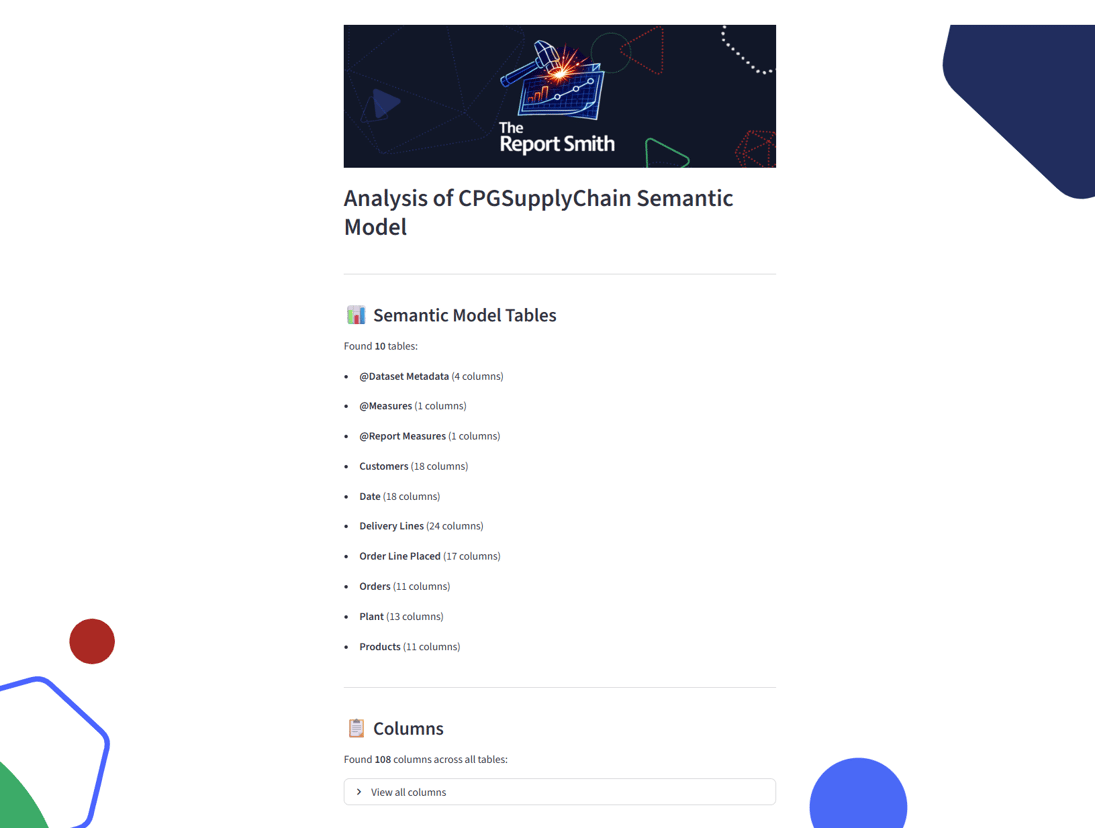
On the next screen the app recovers the metadata from that semantic model. Specifically, the tables, columns, measures (inc. DAX) and relationships in the model, displays them to the user and outputs them into a markdown file next to the report files. This is achieved by using the XMLA endpoint for the semantic model you are using to query the DMVs (this means the app requires you to have the model in a Fabric/PPU capacity). These DMVs are SQL-like metadata tables that exist behind every semantic model. They can be seen (& explored) in the DAX view of Power BI desktop for a locally developed semantic model, or via a 3rd party tool like DAX Studio.
From here the user has a branching option. They can proceed directly to building the report by uploading a JSON based specification of the visual elements, in our predefined and documented format; this specification is a simplification of the PBIR visual.json file format.
Alternatively, they can use the app’s agents to design a wireframe, map their fields into that wireframe and then create the JSON. If you go down this route, you can upload files and then tell the agent what you want it to build. In our demo, we give the agents one of our sunbeam workshop outputs, a list of user questions, and a summarised transcript of an interview with our core stakeholder. The user then authenticates to Databricks, then sends a prompt to the agent - this prompt can be as simple as “report please” or include desires for report layouts/content, etc. The app sends this, the users input files and model schema, to the endpoint of our Databricks foundational LLM model of choice using the architect persona to create a high level, page by page, spec for the report.
The response is outputted as a markdown file, which is then split by page and sent back to the model endpoint, this time using the visualiser persona. The visualiser returns an SVG specification for the wireframe, which is saved to outputs and then rendered in the app. The user can send new prompts to the chat and get it to revisualise as many times as they want.
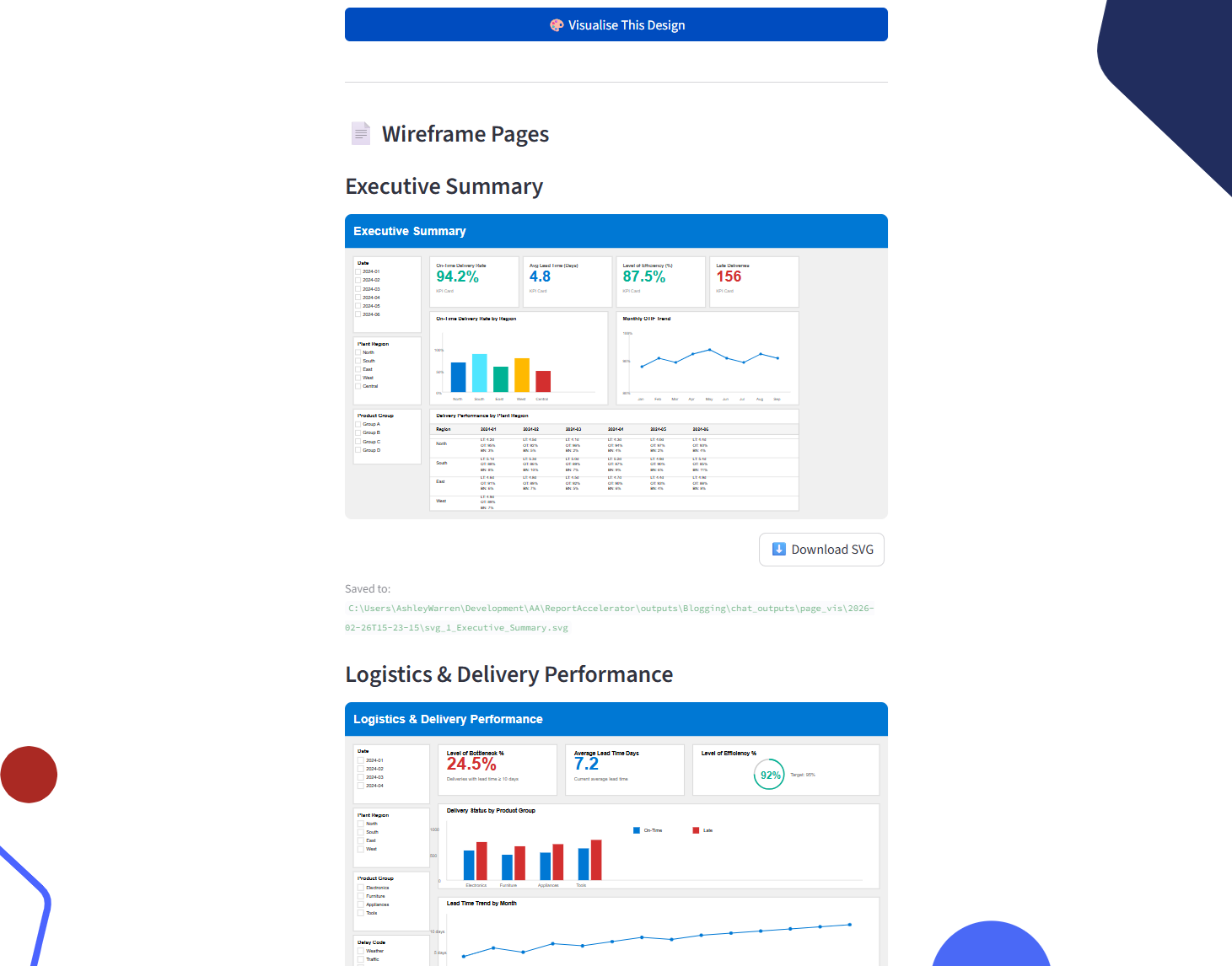 Once the user is happy with the outputs of this conversation, they can then proceed to final field mapping and JSON schema creation. This is done by sending the output files from the previous LLM calls of the chosen design, along with the schema to the model endpoint using our field mapping persona. This returns the final report spec in the JSON format we need for creating PBIR files.
However the user gets to the JSON spec, via manual upload or LLM generated, it is then passed to a validator module that checks it for issues. This validator module is deterministic (as is the field mapping persona’s output), and tells the user if there is an issue - the LLM process has been configured and tested to avoid this happening, although that does mean there are limitations in the types of visuals that can be created and in the capability to exactly match the SVG wireframes.
The final step is the PBIR creation process. The app iterates over each visual in the JSON spec, passes its definition to a function which creates the visual.json files and then insert them into the PBIR format and hooks them all into the page and report definition files. The user can then open the report in Power BI desktop, like any other PBIP report!
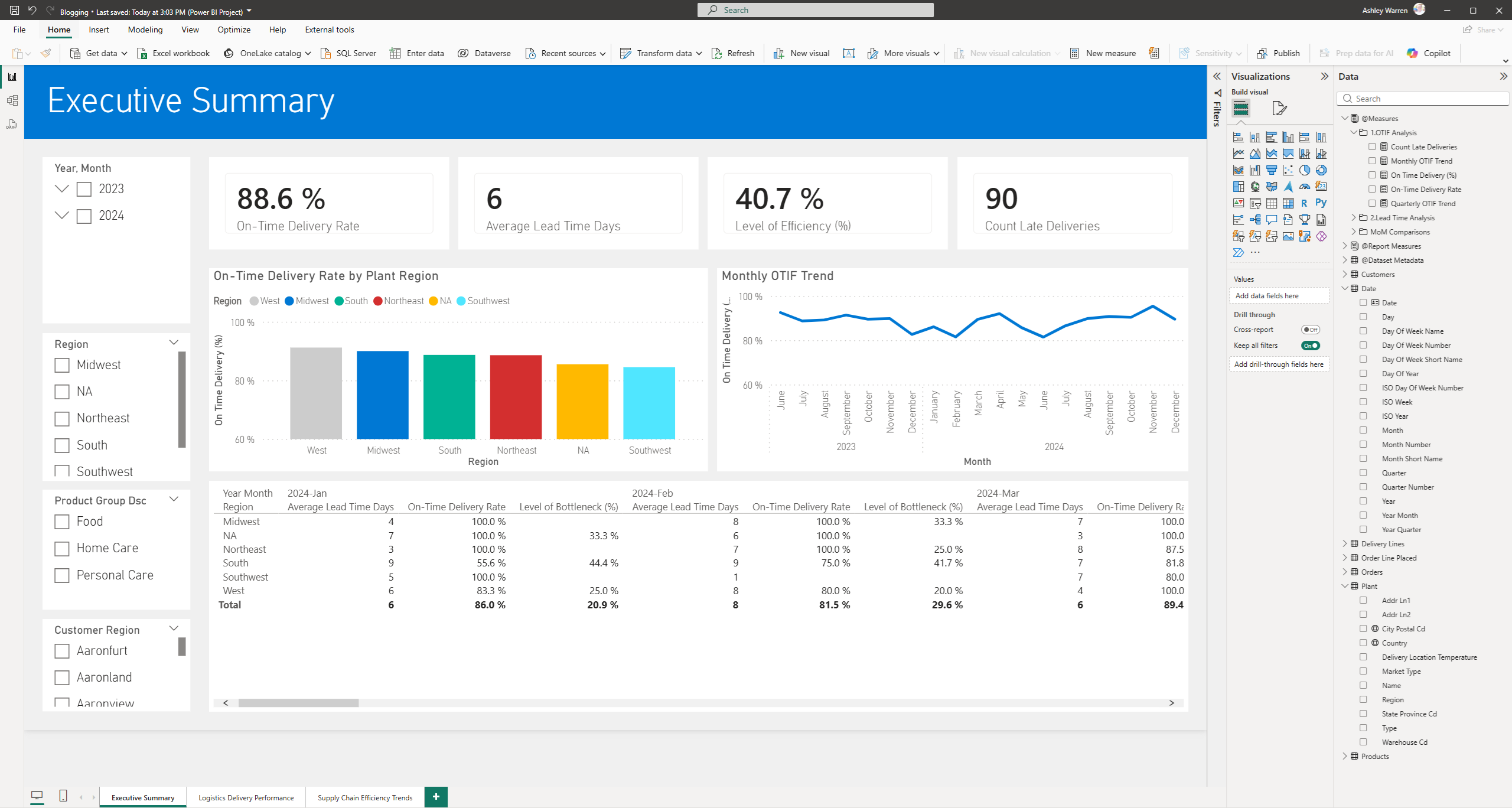 The functionality of The Report Smith has far exceeded where we thought we would get to in the timeframe and its accuracy and faithfulness are well beyond what we hoped to achieve for a prototype! All of the above was delivered in a two and a half week sprint, on top of our normal working hours.
We are beyond excited to demo The Report Smith at our team meeting tomorrow (as of time of writing) and keep our fingers crossed that the judging panel can see how this can have a profound impact on our report development process.
25th February 2026:
How did it go down?
A few weeks have passed, and I am delighted to say, we won the hackathon! You might also have seen that we are so happy with where we got to, that we’ve released a video to our YouTube channel sharing a working demo of the app. I would highly recommend you check that out next to see the app in action:
If you’ve read this far, thank you. I started this blog with a simple statement: “I’m Ashley, and I’m an AI skeptic”. I’d like to end it by issuing a correction…
I’m Ashley, and I’m an AI convert.