




The Problem
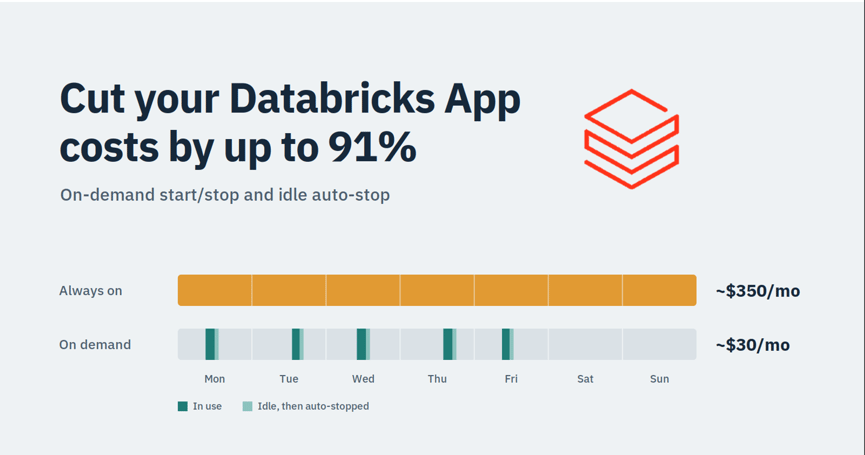
If you’re using a standard Databricks App, it will run 24/7, incurring costs even when no-one is using it. Using the minimum compute specification (a medium app), this comes to about $350 USD per month per app (Pricing Calculator Page | Databricks). For Apps that have intermittent or unpredictable usage, ideally there should be a way for the App to be available when the user needs it to be, without having to pay when the user does not. It is theoretically possible to have users turn on and off their own Databricks as needed. This approach however, either requires elevated access or a request to IT to facilitate, and risks human error in the process.
At the time of writing this blog, there is no native way in Databricks to:
- Allow users to start and stop apps without granting them the ‘Can Manage’ permission (which risks users accidentally deleting the app through the UI).
- Terminate the app automatically* after a certain time period if the last app user forgets to shut it down.
 *Scale to Zero functionality exists in Beta for Genie App builder apps but nothing has yet been announced for standard Databricks Apps ( Genie App Builder | Databricks on AWS )
The Solution
To solve this problem we implemented the following:
- Two on-demand Databricks Jobs that users can safely run to start and stop apps, whilst only being granted least-privilege permissions.
- An idle timer inside the app that stops it automatically when nobody is using it (i.e nobody remembers to shut down the app after use).
Our Example Use Case
We had built a Databricks App for one of our clients to optimise a business process, however they only needed to use the App a few hours per week. It seemed unnecessary to pay the full $350 per month for constant compute uptime. By letting users safely start and stop the App on demand, and adding an idle auto-stop, we were able to limit the uptime to more closely match (and only pay for) the usage the business actually needed. This came to about $30 per month, a 91% reduction from the default behaviour of leaving the App running 24/7!
TL;DR Implementation
To get started straight away, head to the repo: Drop-Database-Cascade/DBX-App-Cost-Saving (sample code to implement Databricks App cost-saving functionality: on-demand start and stop, and idle auto-stop).
- Review the README.
- Download the example files and integrate them into your existing Databricks App.
Start and Stop Jobs
Databricks Jobs can call the Databricks Apps API to start and stop apps programmatically. The main benefit of using Jobs is that App users only need ‘Can Manage Run’ on the Start App and Stop App jobs, rather than ‘Can Manage’ on the App itself.
Start Job
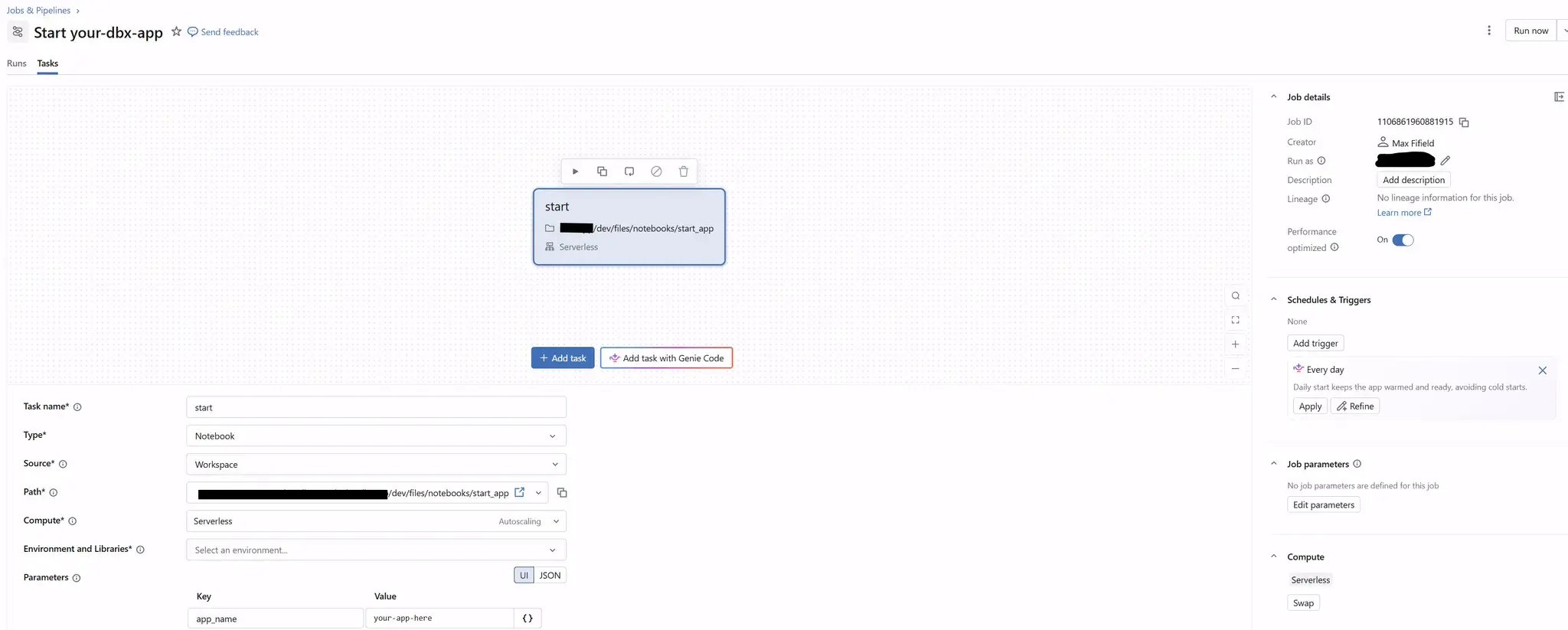
- The Start Job takes one mandatory parameter,
app_name(the name of the app to start), and one optional parameter,warmup_seconds, which delays job completion if your app takes a bit longer to be ready for users after starting up. - The job should run as a Databricks identity that has ‘Can Manage’ on the target App.
- The Start Job does the following:
- Checks the status of the App. If it is already running, it does nothing and finishes successfully; if it is starting, it waits for it to finish.
- If the App is stopped, it starts it and polls the status until the compute is active and the App is in a running state.
- If a warm-up delay is configured, it waits until that time has elapsed, then prints a success message and a link to the App in the job output.
Stop Job
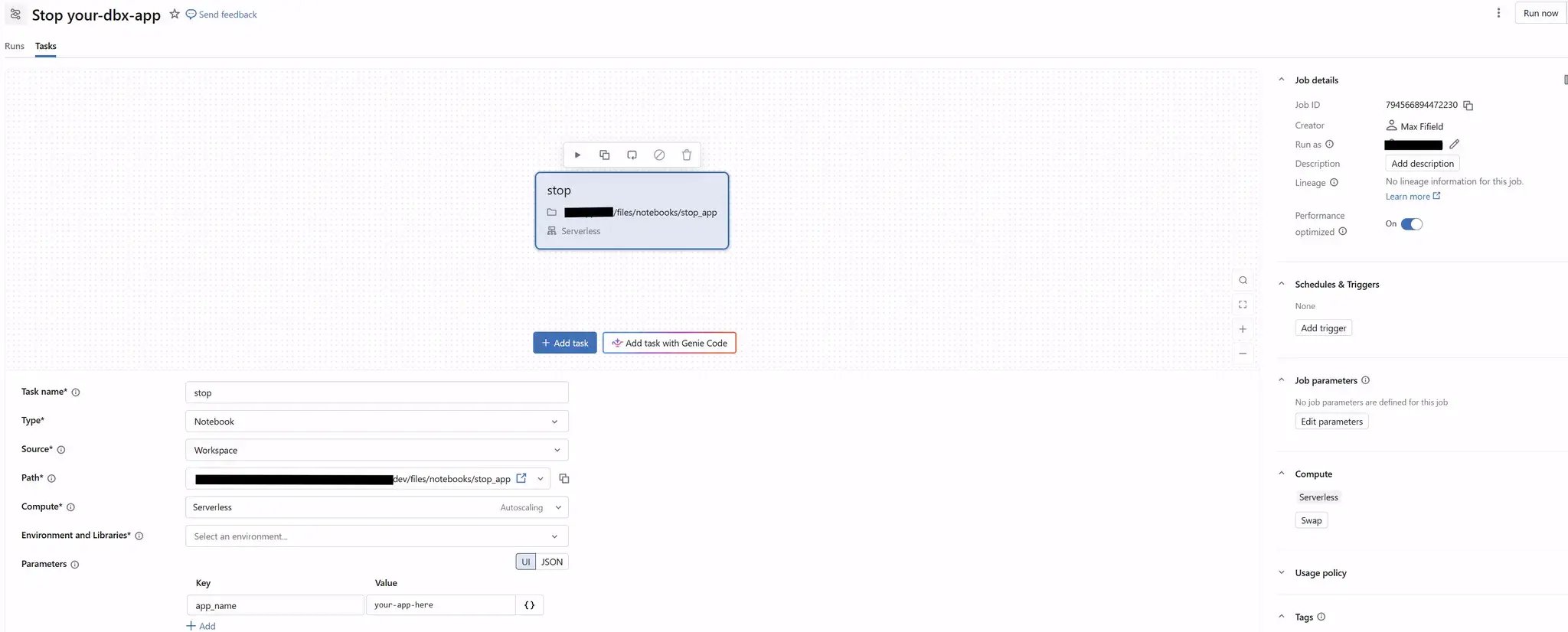
- The Stop Job takes one mandatory parameter,
app_name(the name of the app to stop). - The job should run as a Databricks identity that has ‘Can Manage’ on the target App. In our use case we used the service principal used by the App itself.
- The Stop Job does the following:
- Checks if the App is already stopped. If so, it does nothing and finishes successfully.
- If the App is running, it stops it and polls the status until it is in a stopped state.
Idle Auto-Stop
The second part of the solution handles the case where a user starts the App but forgets to stop it afterwards. Rather than leaving the App running indefinitely, we track user activity and automatically stop the App once it has been idle for a defined period. Our App’s backend used FastAPI, so we implemented the activity tracking as a small ASGI middleware. We wanted the App to stop automatically if no user activity had been detected for 30 minutes, to avoid costs when end users forget to stop it. We also added a fail-safe that stops the App after 6 hours of continuous running, to catch an unexpected process keeping it awake overnight or over a weekend.
How it works
- A small ASGI middleware records the time of every request (and every incoming WebSocket message).
- A background task checks once a minute how long it has been since the last activity.
- When the idle limit is reached, the App calls the Databricks Apps API to stop itself, using its own service principal. That service principal needs ‘Can Manage’ on the App.
The core of it is a timestamp and a middleware that updates it:
class IdleTracker:
    def __init__(self):
        self._last = time.monotonic()

    def touch(self):
        self._last = time.monotonic()

    def idle_seconds(self):
        return time.monotonic() - self._last
class ActivityMiddleware:
"""ASGI middleware that records HTTP requests and WebSocket messages as activity.
ignore_path_prefixes: paths that should NOT count as activity, such as health
checks or endpoints your frontend polls automatically. If a page polls the
backend while a tab is open, the app will never look idle unless you list
that endpoint here.
require_user_header: if True, only requests carrying the user identity
headers added by the Databricks Apps proxy (X-Forwarded-Email /
X-Forwarded-User) count. Check those headers reach your app first.
"""
def __init__(
self,
app,
tracker: IdleTracker,
ignore_path_prefixes: tuple[str, ...] = ("/health",),
require_user_header: bool = False,
) -> None:
self.app = app
self.tracker = tracker
self.ignore_path_prefixes = tuple(ignore_path_prefixes)
self.require_user_header = require_user_header
def _is_user_traffic(self, scope) -> bool:
if scope.get("path", "").startswith(self.ignore_path_prefixes):
return False
if self.require_user_header:
names = {k.lower() for k, _ in scope.get("headers") or []}
return b"x-forwarded-email" in names or b"x-forwarded-user" in names
return True
async def __call__(self, scope, receive, send):
if scope["type"] not in ("http", "websocket") or not self._is_user_traffic(scope):
await self.app(scope, receive, send)
return
self.tracker.touch()
if scope["type"] == "websocket":
original_receive = receive
async def receive(): # noqa: F811 - wraps the original receive
message = await original_receive()
if message["type"] == "websocket.receive":
self.tracker.touch()
return message
try:
await self.app(scope, receive, send)
finally:
# Also record the end, so a long request can't be cut off mid-flight.
self.tracker.touch()A background task compares that to the limit and stops the App via the Databricks SDK:
async def stop_when_idle(app_name, idle_minutes, tracker):
    while True:
        await asyncio.sleep(60)
        if tracker.idle_seconds() >= idle_minutes * 60:
            await asyncio.to_thread(WorkspaceClient().apps.stop, app_name)
            return
The full module in the repo wraps this in an AutoStop class, so integrating it into a FastAPI app takes a few lines:
auto_stop = AutoStop()  # reads its settings from environment variables

@asynccontextmanager
async def lifespan(app):
    auto_stop.start()
    try:
        yield
    finally:
        await auto_stop.shutdown()

app = FastAPI(lifespan=lifespan)
app.add_middleware(
    ActivityMiddleware,
    tracker=auto_stop.tracker,
    ignore_path_prefixes=("/health",),
)
Configuration
The idle limit and the hard cap are set with the AUTO_STOP_IDLE_MINUTES and AUTO_STOP_MAX_HOURS environment variables, in app.yaml or, if you deploy with DABs, in the App’s config in databricks.yml:
env:
  - name: AUTO_STOP_IDLE_MINUTES
    value: "30"   # "0" disables
  - name: AUTO_STOP_MAX_HOURS
    value: "6"    # "0" disables
Things to Watch Out For
- Background traffic keeps the App awake. Health checks, or a page that polls an endpoint while a browser tab is open, look like user activity. Exclude those paths with
ignore_path_prefixes, or the App may never stop. - Run a single worker. A worker is a server process, and your App’s start command decides how many it has (for example,
uvicorn main:appruns one,--workers 4runs four). The idle clock lives in each process’s memory, so with several workers each keeps its own. A worker that happens to get no requests for 30 minutes can then stop the whole App while the others are still serving users. One worker is usually plenty for an internal App, since FastAPI handles many concurrent users asynchronously. If you do need several, store the last-activity time somewhere they all share, such as a small file on the App’s local disk.
Permissions Summary
Only two identities need ‘Can Manage’ on the App; end users never do.

The job run-as identity and the App’s service principal can be the same account. If you deploy with Databricks Asset Bundles (DABs), these grants can be defined in the databricks.yml file.
Other Ways to Reduce Databricks App Costs
While researching this problem, I came across a great article by Maksim Pachkouski on scheduling fixed start and stop times for Databricks Apps: Cut Databricks Apps Costs by 76%: Automate Start/Stop (nearly scale to zero) | by Maksim Pachkouski Databricks MVP | Dev Genius. It didn’t quite fit our use case, as our end users used the App far less frequently and on an ad hoc basis, but his approach offers great cost savings for many Databricks Apps.
I suspect Databricks will eventually add scale-to-zero and auto-terminate for Databricks App compute, which will make cost management even easier. For now, the approach in this blog can save a significant amount in the short term.
Here at Advancing Analytics we’re doing a lot of work with Databricks Apps as part of our AI, Engineering and Analytics capabilities. For more articles and content, see our blog posts here and our YouTube channel here.