






Introduction
A few years back, feature stores became the standard way to bring order to machine learning features by centralising, governing and tracking them. Now we are facing the same challenge with prompts. They multiply quickly, get tweaked without context and become difficult to manage.
Databricks’ Prompt Registry gives prompts a proper home. It provides versioning, governance and a secure Unity Catalog location for storing reusable templates across GenAI projects. Each prompt receives immutable versions, helpful metadata and aliases that you can point at a specific version for controlled updates and clean rollbacks. There is also the ability to optimise prompts automatically using real evaluation data, saving teams from repeated manual tuning and producing improved versions with tracked lineage.
In this blog, we will look at how to create prompts, manageversions, optimise them and use them effectively within Databricks.
Why do we care about the Prompt Registry?
Crafting a good prompt takes time, experimentation and morepatience than most people admit. Much like the feature engineering used intraditional machine learning, prompts quickly become valuable assets thatdeserve proper care. By placing them in a central location with versioning andgovernance, teams can reuse what already works, trace how prompts evolve andadapt them confidently. This avoids duplicated effort, reduces prompt drift andhelps everyone build on shared best practice rather than starting from scratcheach time.
What features are included within the Prompt Registry?
-
Central, Unity Catalog backed storage for prompt templates with variables
-
Immutable versioning for every prompt update, complete with metadata and commit messages
-
Aliases that point to specific versions for controlled updates and easy rollbacks
-
SDK operations to register, load, search and manage prompts across a catalog and schema
-
Integrated prompt optimisation that generates improved variants and saves them back with full lineage
Getting started with Prompt Registry
Before getting started with the prompt registry, it is vitalto ensure that the correct version of MLflow is installed. Otherwise thisfeature will not be available to you. Ensure MLflow 3.1.0 and above isinstalled. This can be done by simply using:
-png-1.png?width=1360&height=96&name=carbon%20(1)-png-1.png)
This can either be run in a notebook cell where it isinstalled at a notebook level, or can be installed at a cluster level using the UI.
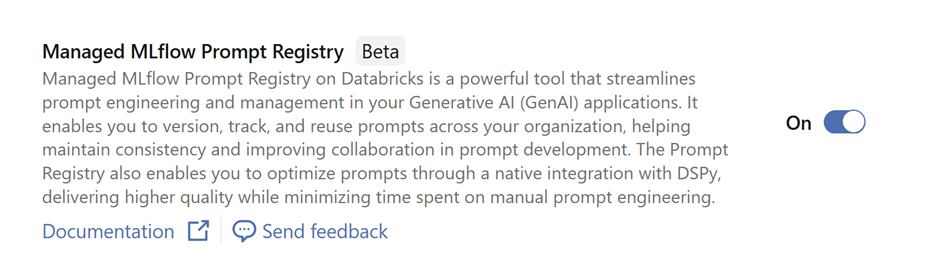
Now that we have the correct version of MLflow, we can now start using
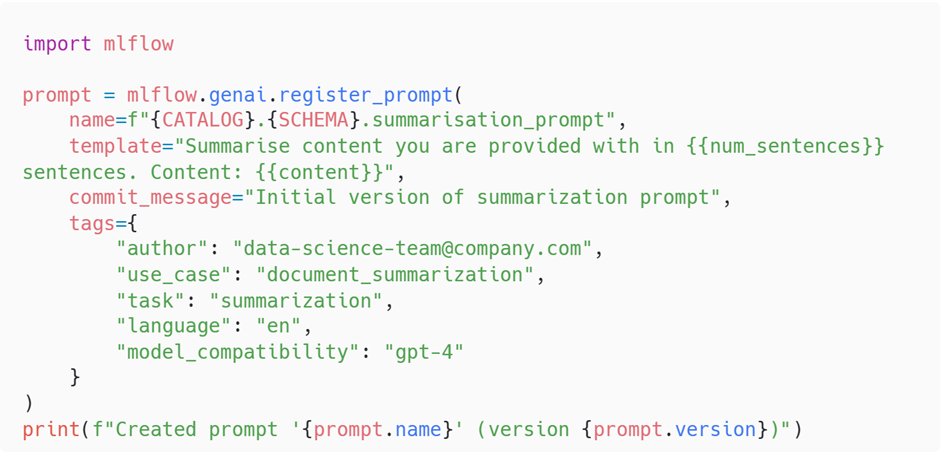
When registering a prompt in the Prompt Registry, you are not just storing static text. You are creating a template that can accept dynamic inputs at runtime. This is done by inserting variables into the body of the prompt using the syntax. These placeholders are later filled in programmatically by your application, notebooks or an optimisation loop.
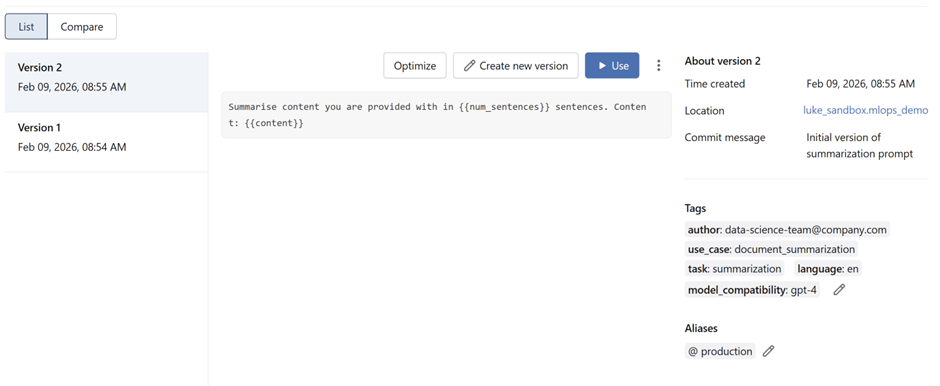
Note that an alias is assigned to a specific version and a chosen alias can only be signed to a unique version number. Attempting to set a previously used alias to a new version will remove the alias from the old version.

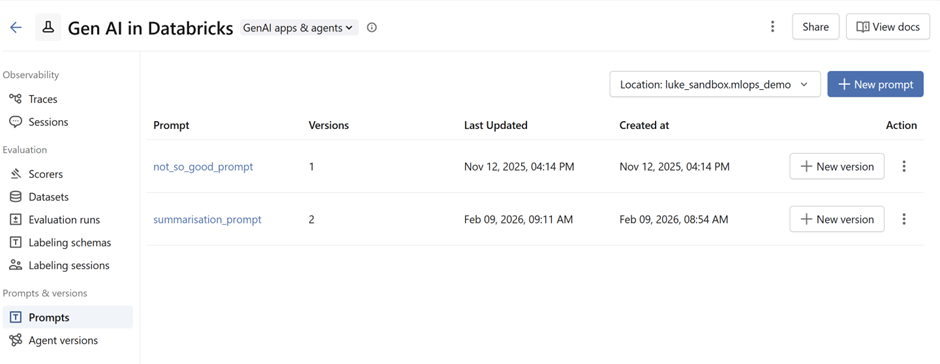
Snapshots of prompts in the prompt registry:
Once a prompt has been registered in the Prompt Registry, you can load it whenever you need it by referencing its fully‑qualified Unity Catalog path. This path includes the catalog, schema, prompt name and the specific version you want to use.

Alongside loading a specific version number, the Prompt Registry also lets you load a prompt by referring to an alias.

Once the prompt is loaded, either by version or alias, you still need to inject the real data into the template. This is done with the .format() method, which replaces the placeholders defined in the template.
For example:

Prompt Optimiser
The Prompt Optimiser is where the Prompt Registry starts to feel genuinely powerful. Instead of relying on guesswork or endless manual tweaking, the optimiser uses real evaluation data to automatically improve your prompts. You give it examples of the behaviour you expect, define how you want prompts to be scored and let MLflow generate, test and select improved variants. The best performing version is then saved straight back into the Prompt Registry with full lineage and versioning.
This turns prompt refinement into a repeatable, data‑driven workflow that can scale with your project. It helps teams avoid ad‑hoc tuning, reduces drift and provides a transparent history of how each prompt evolves.
Setting up the Prompt Optimiser
Below is a quick walkthrough showing how to configure an optimiser for a simple text‑classification task.
Start with your prompt template
You begin by defining a template that includes variables. For example, a classification task might look like this:

Define a predictor function
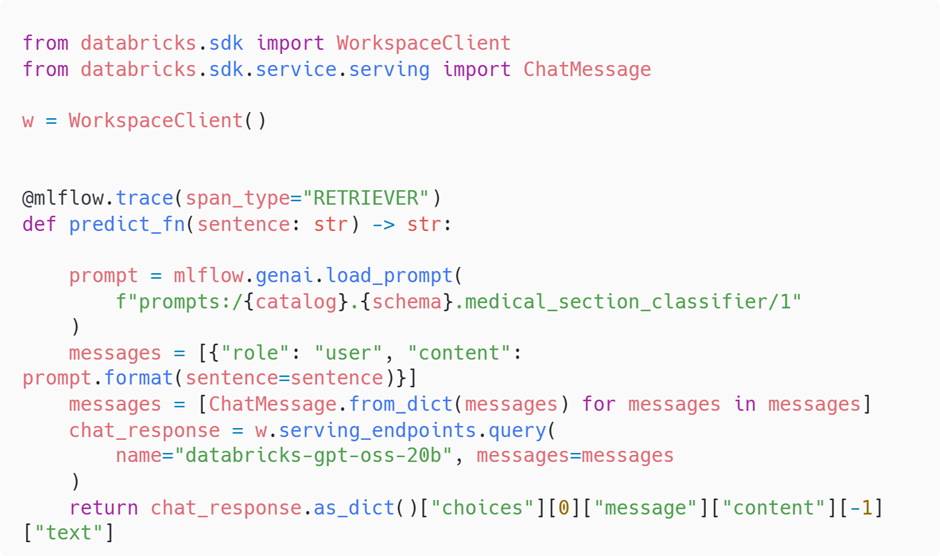
The predictor function is the bridge between the optimiser and your model. It is how the optimiser actually tests each variation of your medical classifier prompt using real examples. The function loads the prompt from the Prompt Registry, formats it with the input text and sends it to a model endpoint to get a prediction. Your code looks like this:
Create the ground truth dataset and applying optimiser
We now build a labelled dataset that captures the behaviourwe want from the medical classifier prompt. Each record contains an inputsentence and the expected label. This dataset is treated as the source of truthduring optimisation. Every candidate prompt is judged against these examples sothe optimiser can measure whether a change is genuinely better.
This structure lets MLflow compare the model’s predictionfrom your predict_fn with the expected label for each example.
How the GEPA optimisation works
Under the hood, MLflow’s optimiser is running GEPA viaGepaPromptOptimizer. GEPA is an evolutionary prompt‑optimisationapproach that mixes LLM‑driven reflection with multi‑objectiveselection. In practice it:
-
Starts from your current prompt
Pulls the initial version from the Prompt Registry andtreats it as the first “parent” in a population.
-
Evaluates the prompt on your ground truth
Calls your predict_fn across the dataset, records outputsand any trace data, then scores results using your chosen metrics such ascorrectness. Each prompt gets a vector of scores across examples and metrics.
-
Reflects to find weaknesses
A separate reflection model reads successes and failures, then writes natural‑language critiques and suggestions like “tighten class list”, “ask for justification”, or “clarify output format”. These are high‑level edits rather than token‑level tweaks.
-
Evolves new prompt variants
GEPA turns those reflections into concrete edits, generating multiple candidates per generation. Think of it as genetic “mutations” at the instruction level, for example reordering sections, adding constraints, or adjusting few‑shot examples.
-
Applies Pareto selection
Because you can track more than one metric, GEPA keepscandidates on the Pareto frontier where no other candidate is strictly betteron all metrics. Parents for the next generation are sampled from this frontierto preserve diversity and avoid over‑fitting to a single score.
-
Iterates until budget or convergence
GEPA repeats evaluate → reflect → evolve → select for several generations, stopping when it hits your max_metric_calls budget or improvements stall. It maintains lineage and scores for all explored candidates.
Returns the best prompt with lineage
Scores are aggregated across examples, the top candidate ispicked, and the result includes metadata about how it was derived. In MLflow,this is surfaced directly from GepaPromptOptimizer.
The final section of the code wires all of this together.
-
predict_fn supplies model outputs for each example so GEPAcan score candidates against the ground truth.
-
train_data is your labelled dataset that defines success.
-
GepaPromptOptimizer runs the evolutionary loop withreflection and Pareto selection under a metric‑call budget.
-
scorers define what “better” means, for example correctness.
Finally after a few iterations a highly optimised and crafted prompt is generated. Here’s what the final prompt looks like.
-png.png?width=1360&height=5124&name=carbon%20(11)-png.png)
Using the Optimiser in Production
Once you have an optimised prompt, the natural next step is to automate the improvement cycle in a live environment. The Prompt Optimiser can play a central role in an LLMOps loop, where real ground truth data is gathered over time and fed back into the optimisation process. As users interact with your system or as human reviewers correct outputs, these examples can be collected and added to the training dataset that guides the optimiser. GEPA works by evaluating prompt candidates against a labelled dataset and using reflection and multi‑objective selection to refine them iteratively, so continuously expanding your ground truth allows the optimiser to adapt prompts as behaviour or requirements evolve.
In production, this needs to be approached safely. Any automated optimisation pipeline should sit alongside proper guardrails, including A/B testing and monitoring, to make sure new prompt versions do not introduce unwanted behaviour. GEPA generates variants by applying LLM‑driven reflections and mutation steps, so validating changes before full rollout is an important part of keeping systems predictable and stable.
When done right, this creates a powerful LLMOps loop. Prompts can evolve as your data grows, and the system can steadily improve without relying solely on manual tuning. The same setup is also useful during development. Even before production traffic exists, the optimiser can generate a strong baseline prompt that outperforms hand written templates and gives teams a reliable starting point for building downstream features or evaluations.
Conclusion
Just as feature stores once brought discipline and clarity to machine learning features, the Prompt Registry now offers the same stability for prompts. It gives prompt engineers a dependable home for their work, complete with versioning, governance and optimisation that help teams stay organised and improve steadily over time. With clear lineage, controlled updates through aliases and the option to automate optimisation using real evaluation data, the Prompt Registry transforms prompts from scattered snippets into shared, well‑managed assets that support collaboration and long‑term quality.
For anyone building GenAI systems at scale, this is a tool that not only keeps your prompts under control but also empowers your prompt engineers to deliver stronger and more consistent results. It is a fitting way to support your local prompt engineers, and a strong step toward treating prompts with the same care and structure as any other core component in your machine learning stack.
Feel free to get in touch if you have any questions about implementing an LLM or GenAI platform.