






Overview
A well-designed model is much more than a curated layer star schema. To get the best experience for downstream consumers of the model, while also ensuring that a model minimises usage of Fabric capacity resources, there are many additional impactful ways to improve usability and performance.
This list provides guidance on how to best design a Fabric semantic model, based on our extensive real-world experience helping diverse customers to build analytics solutions. Some tips are focused on Import mode, but many of the recommendations apply generally and are organised into categories according to the primary benefit achieved through implementing them.
Star Schema and Dimensional Model
A model that conforms to a star schema and follows conventional dimensional modelling techniques is, of course, one great way to set your model up for success and unlock performance benefits across many of the categories in this article.
The key characteristics of a star schema are:
- Each fact table is joined to each dimension via a one-to-many relationship with a single direction
- Fact tables only join to dimension tables; if bridge tables are required, then these are also one-to-many relationships with a single direction, where possible
- Dimension tables do not join to each other, except where it is absolutely necessary for the dimension to be snowflaked
- Dimension tables with a snowflake join should also be one-to-many relationships
The further your model is from a conventional star schema, the more likely that the model will perform sub-optimally and require complex DAX for measures. It also significantly increases the risk of incorrect results being produced that may not be easy to spot.
One significant advantage of a well-designed star schema is that the model becomes much easier to maintain over time, and enhancements to add additional attributes or measures are usually very straightforward.
It's rare for a model to be a brand new, never-before seen scenario. Most models conform to one of the core star schema patterns that have been described and successfully applied for many years.
Usability & Ongoing Maintenance
This section may not impact on the performance directly, but these steps are crucial to overall usability and ongoing maintenance of the model and downstream artefacts.
Review the naming convention of all objects in the model
Names should be business friendly and consistent across all models. Field names should be explicit enough to be unique across the whole model, i.e. avoid using column names such as “Name” or “Type” that occur in two or more tables. Ideally do this before building reports to limit rework.
Avoid renaming columns to retain lineage to source
If fields are not renamed in PowerQuery, then we preserve the lineage back to the curated (model source) tables. This has significant benefits for transparency and governance, and is particularly helpful when data issues require troubleshooting.
Implement a PowerQuery row limit parameter
If the .pbix files are to be version controlled, or if the data volumes are too large to fully process into Power BI Desktop frequently, it is useful to set this parameter on all tables with a low default value that can be overridden in the service or during deployment through CI/CD.
Parameterise PowerQuery source connections
This can help to easily switch between Dev, QA and Prod environments, although it is not an essential feature if models are deployed though CI/CD or deployment pipelines.
Hide fields or measures that are not intended for users to add into reports
Surrogate keys should always be hidden, along with measure source columns (those used within measure DAX.) Hidden columns should have the ‘Available in MDX’ property set to False, as this disables MDX hierarchies, which cause an additional memory footprint. Warning - note that this setting disables the column for users that connect to your model directly from Excel.
Use Display Folders to organise fields
This helps other developers, report builders and self-service users to understand the purpose of fields and quickly find what they need.
Use a Measures table with folders
To help navigate the model as a report builder, or especially as a self-service user, implement measures into a measure table. Warning – avoid doing this after reporting is already in production, as moving measures between tables will break reports.
Not all Date fields need to join to a role-playing Date dimension
If a date is only used to add the date as information to a report, then it likely does not require a full associated Calendar dimension. Calendar dimensions are intended for situations where a date is used for trend analysis across multiple facts, or there is a need to use a higher grain such as Year in a slicer. Disabling the auto date/time on the model remains highly recommended.
Identify and implement sorting columns
To help report builders, it is best practice to ensure that the sorting is suitable and appropriate to the use case, especially where alphabetical is not the expected way.
Ensure Model Documentation is available
Documenting a Power BI semantic model is important, especially in enterprise environments, and there are various ways to automate or accelerate this activity.
Format DAX so that it is readable
In Tabular Editor this can easily be achieved using the in-built DAX formatter, and the DAX Formatter by SQLBI is available directly on the web for one-off formatting of specific measures.
Use variables for readability and reuse
Variables help make DAX easier for others to read and subsequently maintain. There can also be performance benefits to using them.
Review repetitive groups of similar measures
Where many similar measures exist, evaluate whether there is a possibility to create a calculation group to centralise and reuse logic. Review how such measures are used in reports before making changes.
Model Size
The size of a model directly affects both refresh and user query performance. While in Import mode the impact can seem more obvious, there is also much to be gained from ensuring a DirectLake mode is kept to a minimum size.
Use appropriate data types in the curated layer
Large semantic models perform best when appropriate data types are used, and this should start at the source where possible. At a minimum this should cover the following:
- For fact columns used in measure definitions, set precise decimals in curated fact tables. Avoid DOUBLE or FLOAT types. Use DECIMAL with the least precision possible
- Surrogate key fields should ideally be INTEGER type for optimal model performance
- Use DATE, not DATETIME, and split Time from Date as a separate dimension when time granularity is required
Change floating points to fixed decimals in the model
This recommendation reduces the cardinality of a column by reducing the number of decimal places stored. Fixed Decimal (Currency) type is a 4 decimal place format suitable for most cases, except for highly critical data such as banking transactions with currency conversion.
It is still recommended to set the lowest decimal precision possible in the curated table and set this to 2 or 3 decimal places if you can, even if in the model you then use Fixed Decimal.
Validate Fact Granularity
Check whether the facts are at the appropriate grain; is it feasible to aggregate to a higher level in the source curated layer? If reporting is only required at monthly level, for example, and the data in the fact table is daily, there’s an opportunity to pre-aggregate to monthly subtotals and create a smaller fact table.
Look for row filtering opportunities
It is recommended to only load the minimum required rows for fact and dimension tables. Reducing the volume of rows improves the performance of both refresh and query of a model, and the best practice is to filter as far upstream as possible. Check whether any tables contain more rows than necessary, e.g. whether you can filter out some historical dates, or whether you need all the product categories.
Remove all large and unused columns such as fact table keys
Avoid including fields “just in case they will be useful”, and prioritise keeping the model compact and with a well-known technical or business requirement for any field included. If your fact tables contain a primary surrogate key column, these should not be part of the semantic model because they significantly increase size.
Reduce unused dimension members
Related to a previous item regarding filtering row content, review whether any large dimensions contain many keys that are unused in facts, and where the unused members are not contributing to any measures or reports.
Avoid adding calculated tables or calculated fields
There are only a very small number of acceptable use cases for these. Logic should be pushed back to the curated tables wherever possible; if this is not possible, then the logic should be in PowerQuery (PQ) rather than as calculated objects in the model; see Roche’s Maxim. Calculated columns do not compress, take more space & impact the model size more than a column that comes from the source or from PQ.
Query Performance
Avoid defaulting values in fact source columns to zero
As a general rule, do not store zeroes in the data for facts and instead, use NULL. Zero can be used where it has a defined business meaning and is required for specific types of business analysis – but this is usually a rare scenario, and in the majority of cases using NULL to represent an empty fact column is entirely adequate and uses less memory.
DAX (and MDX) queries are efficient at only calculating and returning NON EMPTY query results and reducing the overhead and resources used to produce query results, but filling a fact table with zeroes reduces this performance boost. Additionally, it’s often observed that report builders place additional visual or page filters to try to remove these zeroes later on, which compounds the issue by layering on more complexity to the DAX query at runtime.
Avoid many-to-many relationships
Many-to-many relationships should be avoided at all costs. This refers to where the relationship is drawn as below in your model view, with the star notation on both ends and a broken line:
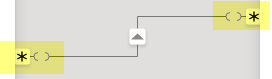 Most guidance and documentation that refers to many-to-many relationships is based on the assumption that the tables have been set up with a bridge table using one-to-many, and this type of relationship above is rarely the best way to resolve the modelling challenge.
Avoid bi-directional relationships
Bi-directional relationships refer to the direction of the arrows that are drawn in the diagram layout of a model. When a model is a star schema, this type of relationship is usually not required, and these models will perform in a more predictable and optimal way with a single direction relationship.
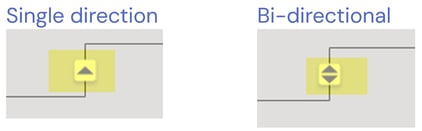
- As far as possible use single direction relationships only
- Only enable bi-directional when absolutely necessary, and only after considering whether the model could be modified to eliminate the snowflaked table
- Do not enable for the sole purpose of facilitating filter propagation in slicers
Reduce the size of bridge & bi-directionally related tables or tables used for RLS
Reduce the size of all tables connected to the user security table and any snowflaked tables between these and fact tables. The larger a bridge table or bi-directional table is, the slower the model performs for queries that must traverse these tables.
Critically review any exceptionally long DAX
Often this is a sign that either the DAX is sub-optimal, or that the model is not optimal, and moving closer to a star schema or aligning more closely to how the business operates will likely enable much simpler DAX.
Avoid forcing values to return zero
Do not create measures that evaluate to zero, as this is expensive on compute. It is best for the engine if measures default to BLANK() when the result has no value. If a zero is required for display purposes, this should be implemented via formatting.
Use DAX function best practice
For best performance it is advisable to:
- Use the DAX Measure DIVIDE function which natively handles divide by zero, rather than using the / sign for division
- Avoid iterators such as SUMX, RANKX unless absolutely necessary
- Optimize SWITCH & Variables
- Avoid using IF() when possible
- Avoid performing error checking in measures
Understand reporting use cases
A technically well-designed model can unfortunately still perform poorly if it does not align to how the business analyses their own metrics and drivers. Ensuring that a model builder has sufficient insight into how the business domain operates, and how the model helps to meet strategic aims and goals, is essential to a good design. Otherwise, there is a risk that report builders will need to write complex (and possibly slow) DAX to meet the analytical needs, or build poorly performing tabular-style reports that serve as data dumps for analytical use elsewhere.
Accuracy & Referential Integrity
Referential integrity (RI) relates to the validity of the joins between tables. Good RI in a model means that all the dimension surrogate keys found in the fact tables have a corresponding row in the dimension table.
Validate dimension to fact joins in curated layer
Whilst it is possible to validate referential integrity after a model is built using Vertipaq Analyzer or similar, it is recommended to run checks on the curated layer and ideally automate these on a schedule. There should not be referential integrity or cardinality surprises at model process time. Examples:
- Check row counts of all model source table/views– do they look reasonable?
- Check referential integrity of each fact to dimension join
- Are there a high number of facts joined to the dimension's Unknown member?
Identify Referential Integrity issues in the model
Despite best efforts in the curated layer, referential integrity (RI) issues may still occur in the model. When fact keys are missing this causes:
- Slicers in reports to show a value of Blank as an option - end users dislike this!
- Measure results may show incorrect values when the dimension is filtered
Implement fact table count measures
While these may not be used in reporting, measures in the model that calculate basic row counts of the main tables are extremely useful for validation and troubleshooting purposes.
Refresh Performance
This section is particularly relevant for Import mode semantic models.
Limit transformations in PowerQuery
Especially avoid Merge and Append functions, and any steps that do not query fold (pushing transformations back to the source), since these can increase processing times and may impact source systems.
Ensure Fabric and Databricks are in the same Azure region
For best performance, ensure that the Fabric capacity is co-located in the same region as the source data. When processing occurs across different regions, the impact on refresh speeds can be significant, particularly where data volumes are high.
Review past refresh history
The Monitor tab in the Power BI service provides historical averages that can help determine if the refresh duration is acceptable and fits sensibly within the window of frequency. For example, it is not sensible to have an hourly refresh on a model that takes 30 minutes to refresh.
Is the refresh duration reasonable?
Cross check against the sizes of the tables and model in Vertipaq Analyzer to see if this duration looks reasonable, and compare to other models to see if it is in the same ballpark.
Refresh Scheduling
Ensure that the refresh is scheduled at an appropriate time for the target users e.g. outside of their working hours.
If it is important to have the model refresh as soon as the data source is updated, then consider ways to trigger or sequence processing rather than scheduling frequent refresh times. Having your model refresh more frequently than the source is updated adds unnecessary load to the Fabric capacity.
Consider increasing refresh parallelism
Depending on the number of tables in the model and the capacity being used, it may be possible to speed up the overall model refresh duration by increasing the parallelism of the refresh operation. By default, the Power BI service runs 6 tables in parallel (if incremental refresh is enabled then count partitions) but this can be increased, and this may be beneficial if the model has many tables.
Check if gateways are adequate
When a gateway is used for connections between the models and the source data, the performance and configuration of the gateway can significantly impact the reliability and speed of refresh operations, and therefore should be optimised.
Incremental Refresh
For an in-depth article on refresh and in particular greater detail on incremental refresh scenarios see Semantic Model Refresh in Fabric: Beyond the Defaults.
Determine whether incremental refresh is necessary
The primary use case for incremental refresh is where the fact table is large but most historical partitions do not change. However, there is also a potential use case where historical data needs to be frequently refreshed, and incremental refresh helps by adding and managing partitions that can be refreshed in parallel, resulting in faster overall refresh duration.
The decision to implement this is a balance between the additional complexity of the model and its deployment, versus the increases gained in refresh speed.
Use an effective partition strategy
Evaluate whether the partition strategy is appropriate and effective. The aim is to have partitions of similar sizes that are also large enough to be impactful. Ensure that the partitions are helping to improve processing speeds.
Increase refresh parallelism
It may be the case that incremental refresh has been configured, but the overall refresh duration is not as fast as expected. By default the Power BI service will run 6 partitions in parallel, but depending on the Fabric capacity this can be increased significantly (within limits).
If there is a high partition count, it may be beneficial to increase the parallelism of the refresh operation. However, it is recommended to consider whether the data source can handle the additional concurrency and if the source has its own throttling limits.
Evaluate if Detect Data Changes can be used
Incremental refresh can be made more selective (i.e. faster) if changes are accurately tracked in the source by using the Detect Data Changes option. The refresh can skip refreshing partitions where data hasn't changed.
Implement a custom refresh method to override the policy
To mitigate any potential data issues that could creep in, run a periodic (e.g. weekly) full refresh of all incrementally updated partitions; see Semantic Model Refresh in Fabric: Beyond the Defaults for an example method.
Conclusion
By following best practices and investing the time to design your semantic model properly, you set your organisation up for long-term efficiency, accuracy, and scalability, which ultimately help your organization make better data-driven decisions.
While good modelling practices are always valuable, it becomes essential if your semantic model implementation incorporates one or more of the features below:
- Models that power enterprise‑scale analytics across many reports and users
- Fabric costs that need to be tightly controlled
- Frequent model changes or rapid iteration cycles
- Multiple model builders contributing across the Fabric estate
- Strict data governance or regulatory requirements
- Large or complex data sources with high cardinality
- High expectations for report performance
Contact us to understand how we can help to optimise your models or empower your teams to design high-performing semantic models.