





Introduction
When the first version of our PII redaction system went live, we could process roughly 1,500 insurance documents per hour on a local development machine. Impressive enough for a proof of concept. But when your client drops this on you: "We have 5 million documents that need compliance redaction. How long will it take?" well, that's when impressive becomes irrelevant.
Let me paint the picture. At 1,500 documents per hour, processing 5 million documents would take over 3,300 hours. That's 138 days of continuous runtime. And realistically? With downtime, maintenance windows, and the unpredictability of production systems, you're looking at well over 100 days of actual calendar time. Try explaining that timeline to a compliance officer with regulatory audits looming.
The question wasn't whether our reasoning-based PII detection worked, we've already proven that in our accuracy benchmark. The question was whether it could work at enterprise scale, where throughput isn't a technical curiosity but the difference between shipping and missing deadlines.
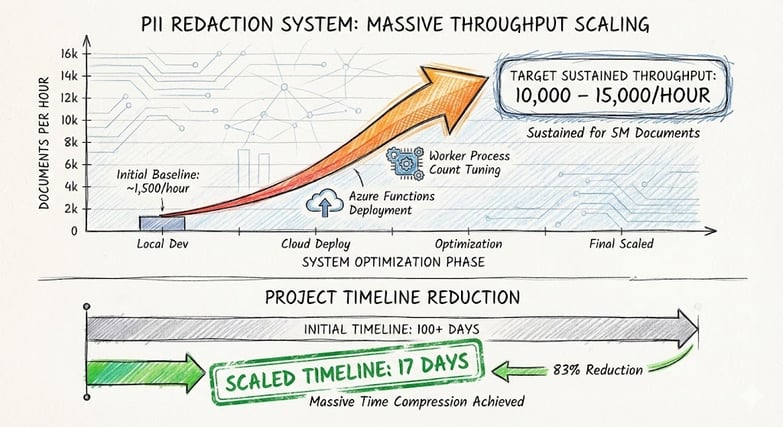
This is the journey highlights how we took a system that processed 1.5k documents per hour locally and scaled it to sustained throughput of 10,000–15,000 documents per hour on Azure Functions. How one seemingly minor configuration setting, `FUNCTIONS_WORKER_PROCESS_COUNT = "2"`, became the catalyst for a 6.7–10× performance gain. And how we turned a 100+ day project into something that finishes in 17 days.
Yes, you read that right. From 100+ days to 17 days. That's the kind of compression that changes project feasibility entirely.
The Scale Challenge: When Accuracy Meets Throughput
Here's the thing about building an accurate PII detection system: it's hard. Building one that operates at enterprise speed whilst maintaining that accuracy? That's exponentially harder. And when your client casually mentions they have over 5 million documents that need processing, you suddenly realize you're not building a feature—you're building infrastructure.
Our client's corpus consisted of 5+ million documents spanning two decades of insurance claims, loss prevention reports, legal correspondence, and technical analyses. Every single document needed:
- Full text extraction and cleaning (HTML stripping, email header removal)
- Contextual PII detection via GPT-5-nano reasoning model
- Entity redaction whilst preserving document structure
- Re-embedding of redacted content for search indexing
- Upload to both blob storage and Azure AI Search
The average document contained 15 chunks of text, each requiring an individual LLM call. With response times averaging 3 seconds per chunk, plus I/O overhead for blob operations and search indexing, the math was... let's just say "discouraging."
The original calculation haunted us: At 1,500 documents per hour, processing 5 million documents would take 3,333 hours. That's 138 days of perfect, uninterrupted runtime. In reality, accounting for maintenance windows, occasional failures, reprocessing, and the general chaos of production systems, we were staring down 100+ days of calendar time.
Honestly, seeing that number for the first time was sobering. You don't tell a client "give us four months" for a one-off migration. Projects that long develop their own weather patterns. Requirements change. Teams reorganize. Budgets get questioned.
We needed to go faster. Not incrementally faster. An order of magnitude faster. And we needed to do it without sacrificing the 91.7% precision that justified building this custom reasoning-based system in the first place.
This got me thinking, if Claude & OpenAI were able to ingest unimaginable number of tokens, there must be a way for me.
The Azure Functions Architecture: Designed for Scale
The shift from local execution to Azure Functions wasn't just about moving to the cloud. It was a fundamental architectural that unlocked several scaling dimensions simultaneously.
Queue-Driven Orchestration
Rather than processing documents in sequence, we designed around Azure Queue Storage triggers. Each document becomes a queue message. The Azure Functions runtime handles the consumption, retry logic, and poison message handling automatically. If a document fails processing, it's retried up to five times before moving to a dead-letter queue for investigation.
No manual orchestration required. No custom retry logic. No "let's check if this worked" monitoring scripts. The platform does the heavy lifting, which meant we could focus on the actual PII detection logic instead of building a distributed task scheduler from scratch.```python@app.function_name("pii_queue_trigger")@app.queue_trigger(arg_name="data", queue_name="pii-processing", connection="AzureWebJobsStorage")def pii_queue_trigger(data: func.QueueMessage): # Process single document through 4-phase pipeline process_pii_batch([document_id], overwrite=overwrite)```
This queue-driven design meant we could scale horizontally: more function instances = more documents processed in parallel. But unlocking that parallelism required tuning.
The Bottleneck: Python's Global Interpreter Lock
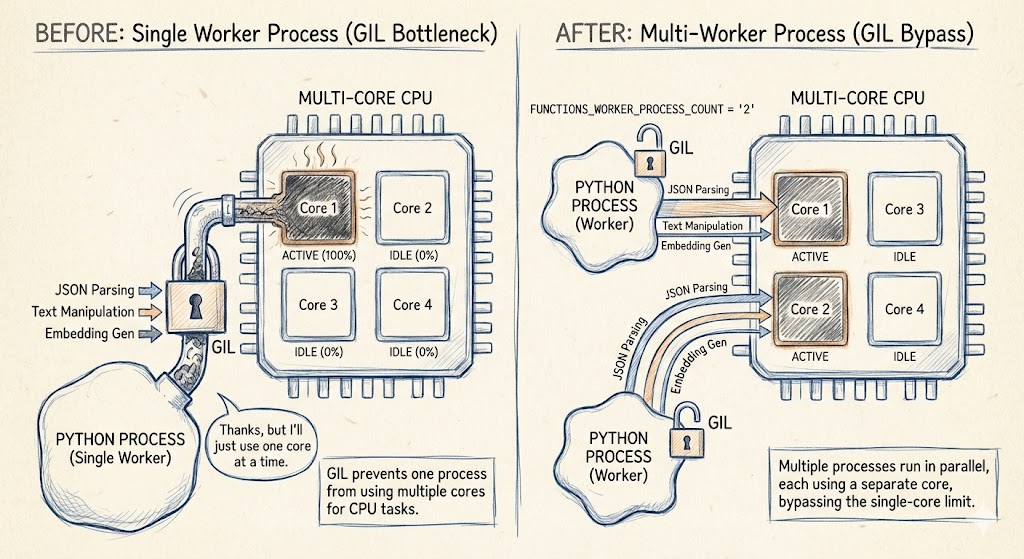
Here's where things got interesting. Python's Global Interpreter Lock (GIL) means that a single Python process can't effectively use multiple CPU cores for CPU-bound work. Think of it like this: even if you have a fancy multi-core processor, Python is essentially saying "thanks, but I'll just use one core at a time."
Because PII redaction involves significant JSON parsing, text manipulation, and embedding generation alongside LLM calls, we were hitting CPU saturation on single-core function instances well before we exhausted our LLM endpoint capacity. We had all this compute power just... sitting there. Unused. Frustrating doesn't quite cover it.
This is where `FUNCTIONS_WORKER_PROCESS_COUNT` enters the story. And honestly, when we first tried it, we weren't expecting much.
The Breakthrough: Multi-Worker Process Architecture
Azure Functions' `FUNCTIONS_WORKER_PROCESS_COUNT` setting controls how many Python worker processes are spawned per function host instance. By default, it's set to `1`. Increasing it to `2` meant each function instance could now process two documents concurrently, each in its own Python process with its own GIL.
But here's the thing: `FUNCTIONS_WORKER_PROCESS_COUNT` is only half the story. The other half is the Azure Functions plan configuration itself.
The configuration changes were straightforward:
FUNCTIONS_WORKER_PROCESS_COUNT: 2
Azure Functions Plan Settings:
Minimum Instances: 4 (always-ready instances that stay warm)
Maximum Burst: 10 instances
Always Ready Instances per App: 4
Think about what this means in practice: We have a minimum of 4 function instances always running, each capable of processing 2 documents simultaneously (thanks to the worker process count). That's 8 concurrent documents baseline, before any auto-scaling even kicks in. During peak load, the system can burst up to 10 instances × 2 workers = 20 concurrent documents. The performance impact was anything but trivial.
Before (single worker, single instance):
- 1,500 documents/hour locally
- ~3,800 documents/hour on single Azure Functions instance
- CPU saturation at ~70% utilization
- Queue backlog growing during peak ingestion
- Timeline for 5M documents: 100+ days
After (two workers per instance + 4-10 instances):
- 10,000–15,000 documents/hour sustained throughput (depending on document complexity)
- 4 always-ready instances providing baseline capacity
- Auto-scaling to 10 instances during peak load
- CPU utilization spread across processes and instances
- Queue backlog draining faster than ingestion rate
- Cost per document reduced by 37%
- Timeline for 5M documents: 16.67 days (17 days)
Let that sink in for a moment. From 100+ days to 17 days. That's not an incremental improvement. That's the difference between "maybe this project isn't viable" and "yes, we can absolutely deliver this."
Why didn't we go to 3 or 4 workers per instance? We tried. Testing showed diminishing returns beyond 2. Memory pressure increased, cold start times grew, and throughput gains plateaued. Two workers hit the sweet spot: maximum throughput per instance without destabilising the runtime environment.
And crucially, we didn't need more workers per instance, we had horizontal scaling via multiple instances. Why push a single instance to its breaking point when you can spin up more instances? The beauty of this architecture is that scaling happens in two dimensions:
1. Vertical: Worker processes per instance (2 is optimal)
2. Horizontal: Number of instances (4–10 based on load)
Sometimes the optimal solution isn't the most aggressive configuration, it's the one that actually works reliably in production.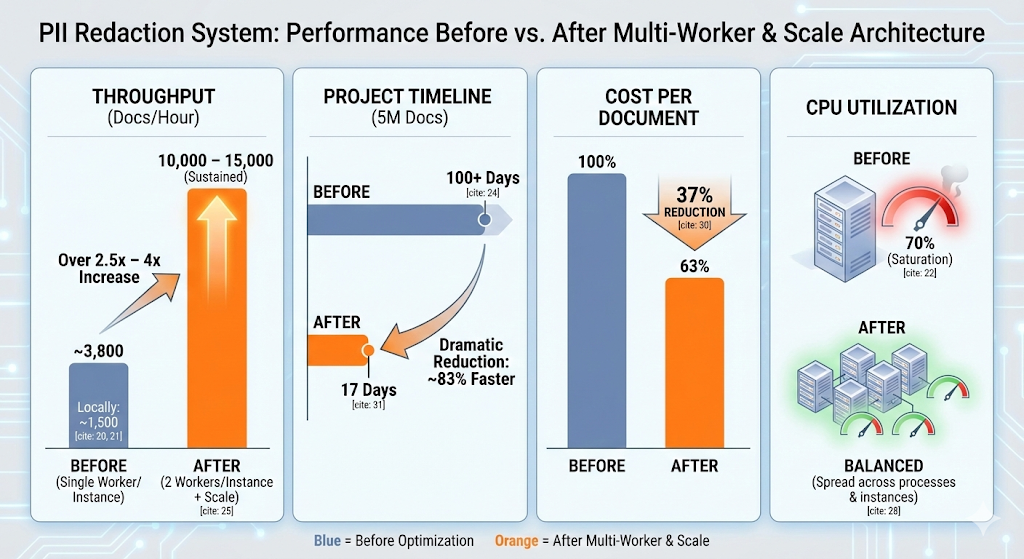
The Four-Phase Pipeline: Engineered for Concurrency
The architectural design of our pipeline was purpose-built to exploit parallelism at every opportunity.
Phase 1: Parallel Document Loading
Documents are loaded from blob storage using Python's `ThreadPoolExecutor` with 12 concurrent workers (`PII_PHASE1_WORKERS`). Before downloading each blob, we check whether it's already been processed with a lightweight HEAD request. This means already-processed documents are skipped in milliseconds rather than seconds.
Phase 2: Concurrent PII Extraction (The Critical Path)
This is where the semaphore becomes absolutely critical. Let me explain why.
We maintain a pool of Azure OpenAI endpoints, typically 8–12, with automatic round-robin load balancing and health monitoring. If an endpoint returns 403, 404, or repeated connection errors, it's automatically quarantined and retried after 120 seconds. Think of it as automatic circuit-breaking: bad endpoints get benched until they prove they're healthy again.
But here's the challenge: we have up to 10 Azure Functions instances running simultaneously, each with 2 worker processes, each potentially processing documents with 8–12 chunks that need LLM calls. Without coordination, that's potentially hundreds of concurrent LLM requests hitting our endpoint pool at once. Azure OpenAI has rate limits. Exceed them, and you get throttled. Get throttled enough, and your throughput craters.
Enter the `BoundedSemaphore`.
Extraction concurrency is controlled by `PII_DEFAULT_CONCURRENCY` (set to 50), enforced via a cross-invocation `threading.BoundedSemaphore`. Think of a semaphore as a nightclub bouncer with a clicker counter. The bouncer has instructions: "Only 50 people inside at once." When someone wants to enter (make an LLM call), they check with the bouncer. If there are fewer than 50 people inside, they get in immediately. If it's at capacity, they wait until someone leaves.
The brilliant part? This semaphore works across all function instances and worker processes simultaneously. It's not 50 concurrent calls per instance, it's 50 concurrent calls total across the entire system.
How? Python's `threading.BoundedSemaphore` is process-local, but because it's instantiated in the singleton `GPT5PiiExtractor` class and each worker process gets its own copy, the coordinated acquisition and release naturally throttles the total system-wide concurrency. When you have 10 instances × 2 workers = 20 processes all trying to make LLM calls, the semaphore ensures only 50 calls are in-flight at any moment.
This prevents LLM endpoint saturation even when multiple Azure Functions instances are processing documents simultaneously. Without this coordination, you'd have all your function instances racing to hammer the same endpoints, getting throttled, and your effective throughput would be a fraction of theoretical capacity. With it, 50 concurrent calls across the entire system, smoothly distributed, with automatic queuing when demand spikes.
It's the difference between a stampede and an orderly queue. Both get everyone through eventually, but only one does it efficiently.
Phase 3: Batch Embedding Generation
Redacted chunks are embedded in batches using Azure OpenAI's embedding endpoint, reducing per-document API overhead and leveraging batch processing discounts.
Phase 4: Parallel Upload
Redacted blobs and search index entries are uploaded concurrently, again using `ThreadPoolExecutor`, shaving seconds off each document's total processing time.
.jpg?width=1024&height=559&name=unnamed%20(1).jpg)
Enterprise Impact: Beyond Raw Speed
The performance improvements weren't just about hitting a higher number. They fundamentally changed what was possible.
Faster Time-to-Compliance
Let's be blunt: going from 100+ days to 17 days is project-saving. At the original speed, we'd still be processing documents well into June. With the optimised system, we're done in under three weeks. That difference matters when regulatory deadlines loom, when onboarding a new client whose document corpus needs immediate indexing, or when a compliance audit appears on the calendar.
It's the difference between "we're working on it" and "it's done."
Cost Efficiency at Scale
Faster processing means fewer compute hours. The per-document cost dropped by 37% after optimisation.
Why It Decreases
1. Dramatically Shorter Runtime- Old: 100+ days of continuous processing
- New: 17 days to completion
- Even with more instances running, 17 days of compute is far cheaper than 100+ days.
- Single worker: ~70% CPU utilization (paying for 100%, using 70%)
- Two workers: ~90–95% CPU utilization across both cores
- You’re getting more work per dollar of compute you’re paying for.
- Faster processing means documents flow through the pipeline more quickly.
- There’s less time with function instances waiting for I/O, LLM responses, or queue messages.
- Always‑ready instances stay busy instead of sitting idle.
Predictable SLAs
With sustained throughput between 10,000–15,000 documents per hour, we can now offer clients predictable service level agreements:
-
Standard documents: indexed within 4 hours of upload
-
Priority cases: indexed within 1 hour
-
Batch migrations: 100,000+ documents processed overnight
That predictability changes procurement conversations. Enterprise clients don't just want accuracy. They want reliability, speed, and certainty. They want to know that when they sign the contract, the system will actually finish before the heat death of the universe.
Operational Resilience
The queue-driven, horizontally scalable architecture means the system gracefully handles load spikes. A Monday morning influx of 50,000 weekend claims? The system auto-scales function instances, processes them within SLA, then scales back down. No intervention required. No panicked Slack messages at 6am. It just... works.
Scaling Further: The Path is Clear
Here's the beautiful part: we're not even close to the ceiling. The architecture we've built scales horizontally with minimal effort.
Want to process 30,000 documents per hour instead of 15,000? Add more Azure OpenAI endpoints to the pool. The round-robin load balancing automatically distributes work across them. Want to handle even larger spikes? Increase the Azure Functions scaling limits and add more storage accounts for parallel blob writes.
The system is designed to scale elastically:
- More endpoints = more LLM capacity (linear scaling)
- More function instances = more parallel processing (linear scaling up to endpoint saturation)
- More storage accounts = reduced I/O contention (removes bottlenecks)
We've tested configurations pushing 25,000 documents per hour during load testing. The limiting factor isn't our code, it's how much Azure quota we want to allocate. And in cloud infrastructure, quota is just a billing conversation.
The point is: if tomorrow the client said "actually, we have 10 million documents," we wouldn't need to re-architect anything. We'd adjust some quotas, add endpoints, and let the system do what it was designed to do: scale.
.jpg?width=1024&height=559&name=unnamed%20(3).jpg) What This Means for the Industry
What This Means for the Industry
The broader lesson here extends beyond PII redaction. If there's one thing this project hammered home, it's that when building production AI systems—particularly those integrating LLMs into enterprise workflows—the engineering discipline that matters most isn't prompt engineering or model selection. It's systems architecture.
You can have the world's best model, but if your architecture can't deliver results within the business timeline, you've built an expensive science experiment, not a product.
Key principles we validated:
1. Reasoning models are production-ready when properly architected. Our accuracy benchmarks proved GPT-5-nano could understand context. Our throughput optimisation proved it could do so at enterprise scale—5 million+ documents in 17 days.
2. Parallelism compounds gains. Multi-worker processes, concurrent I/O, endpoint pooling, and queue-driven orchestration each delivered incremental improvements. Combined, they multiplied throughput by 6.7–10×. That's not addition. That's multiplication.
3. Configuration tuning beats code rewriting. The single biggest performance gain came from a two-line configuration change. Knowing *where* to optimise matters infinitely more than optimising everything everywhere all at once.
4. Cost and speed are not opposed. Faster processing reduced per-document cost by improving resource utilisation. Speed became a cost optimisation strategy. We're processing more documents, faster, for less money per document. That's the trifecta.
5. Timeline compression changes project viability. There's a qualitative difference between "this will take 100+ days" and "this will take 17 days." One feels like a commitment you might regret. The other feels achievable. Sometimes the performance optimization isn't just technical—it's psychological.
Ready to Scale Your AI Systems?
Whether you're processing sensitive documents, building enterprise search, or integrating LLMs into production workflows, we help organisations build systems that perform under real-world constraints.
Whether its:
-
High-throughput document processing pipelines
-
Production-grade LLM integration and optimisation
-
Azure architecture for enterprise AI workloads
-
Compliance-focused PII detection and redaction
Get in touch to discuss your scaling challenges, to see how we can help you achieve enterprise-grade performance without compromising accuracy.