






I've been setting up Genie spaces for clients, and the conversations always start in the same place. Someone from the business sees the demo and asks how quickly we can roll it out across the organisation.
The honest answer is: faster than you'd think, and slower than you'd hope. The chat part is the easy part. The hard part is everything underneath it.
What Do I Mean?
Genie doesn't generate answers from thin air. It writes SQL - specifically, it writes SQL against your tables in Unity Catalog, guided by whatever metadata, column descriptions, and semantic configuration you've given it. The quality of Genie's output is a direct function of the quality of that configuration - your column names, your descriptions, your business logic, your table relationships.
This is not a chat problem. This is a semantic modelling problem.
This matters because the way you invest time and money shifts dramatically depending on which framing you adopt.
If it's a chat problem, you optimise the interface. You tweak prompts. You try different question phrasings. You train users on "how to talk to Genie." This is what most early adoption looks like, and it hits a ceiling almost immediately because no amount of prompt engineering compensates for a column called amt_adj_3 with no description and no context.
If it's a semantic modelling problem, you invest upstream. You build the foundations that let Genie reason correctly about your data and those foundations now live in two distinct places, each doing a different job.
Two Layers, Two Jobs
This is the part that most Genie documentation glosses over, and where I see teams make the most expensive mistakes. There isn't one "semantic layer" to configure. There are two, at different levels of the stack, with different scopes and different lifespans.
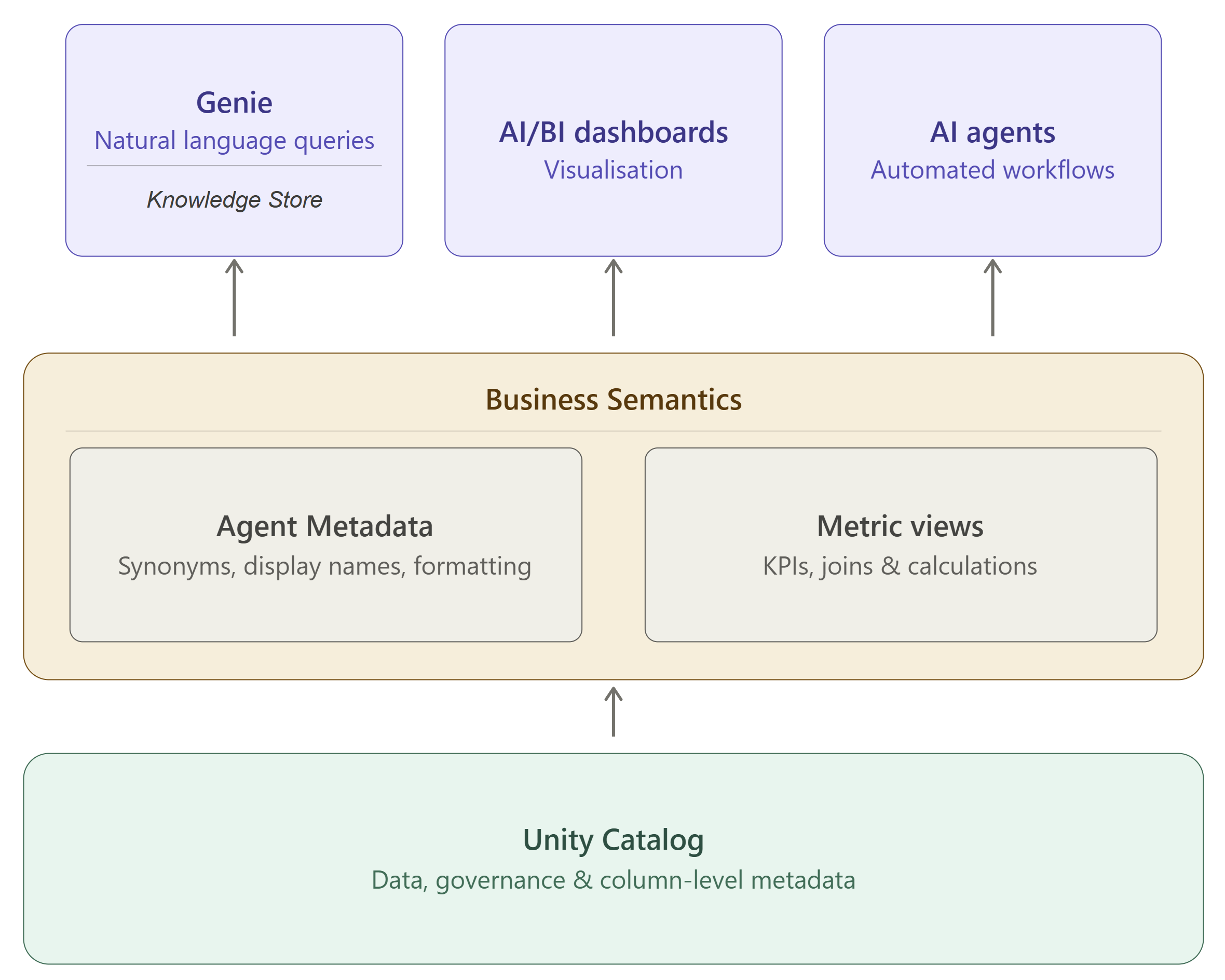
The Knowledge Store lives inside your Genie Space. It's a curated collection of semantic definitions that covers everything Genie needs to understand your data within this particular domain - the language of the business and the ability to connect what users actually say to what the data actually contains. All of it is scoped to the space and never touches Unity Catalog or anything outside it. Think of it as the briefing document you'd give a new analyst not just on day one but through their whole first month: what terms mean in this context, how these tables relate to each other, how your key metrics are calculated, and that when someone says "APAC" they probably mean these four region codes. It's fast to iterate, specific to the use case, and essential - but it stays in the space.
Metric Views live in Unity Catalog Business Semantics, at the platform level. Where the Knowledge Store teaches Genie how to interpret questions in a specific space, Metric Views give every tool in your platform a shared, governed way to query your business metrics. You define a measure once and users can group by any available dimension at query time. The engine generates the correct computation. That definition is then available consistently across Genie, dashboards, agents, and notebooks, sliced however the question demands.
A Metric View defines the calculation: the joins, the KPI logic, the aggregation rules, the filter defaults that should always apply. And within that same definition, you also specify Agent Metadata - the display name, synonyms, and formatting rules that make the metric legible to every tool that queries it. Writing a Metric View means defining the calculation and the language simultaneously. Done well, it's the single highest-leverage piece of semantic work you can do, because it pays off everywhere the catalog is connected, not just in the space you're building today.
The practical question is: which layer does a given piece of knowledge belong in? If it's specific to how this Genie space should reason about questions: Knowledge Store. If it's a metric definition that needs to be consistent across Genie, dashboards, and agents: Metric View.
What You Can Do
With that architecture clear, here's where to start.
Column descriptions in Unity Catalog. Every column that a Genie space touches should have a description that a business user could read and understand. Not a technical comment - a business explanation. For example: "The date the customer's subscription was activated, in UTC. For trial conversions, this is the date the trial ended, not the date they signed up." That level of specificity is what turns Genie from a toy into a tool and this is the foundation that everything else sits on.
Metric Views for your business metrics. For any metric your organisation cares about, define it once as a Metric View - the measure logic, the available dimensions, the filter defaults. Users can then group by whatever dimension is relevant to their question, and the engine handles the computation correctly every time. Add the Agent Metadata alongside it (display name, synonyms, formatting) and the metric becomes consistently intelligible to every tool that touches it. You're not doing two things; you're doing one thing completely.
The Knowledge Store: build it deliberately, not reactively. Most teams treat the Knowledge Store as a place to dump fixes after Genie gets things wrong. That's understandable, but it's the wrong order. Start by adding space-specific descriptions for tables and columns where the Unity Catalog versions aren't quite right for this audience. Add prompt-matching examples for the entities users are most likely to ask about by name. The Knowledge Store is the difference between a Genie space that works and one that mostly works.
Table and column naming conventions. Genie uses names as semantic signals regardless of what else you've configured. A column called customer_lifetime_value_excluding_promotions is harder to misinterpret than cust_ltv_adj_ex_promo. Every abbreviation is a small bet that Genie will guess correctly. Some of those bets will lose.
Use Knowledge Extraction. When a user gives a thumbs-up to a generated query, Genie analyses that interaction and proposes knowledge snippets - potential measures, dimensions, or filters worth codifying. This feedback loop makes your space smarter over time, but only if someone is reviewing and accepting those proposals. Build the habit into your analytics team's workflow.
The Pattern I Keep Seeing
Teams spend weeks building a Genie space, show the demo, get excited, deploy it to users, and then watch adoption flatten. Users ask questions, get wrong or confusing answers, lose trust, and go back to their dashboards. The Genie space becomes a curiosity that nobody uses in anger.
The fix is almost always upstream. Not in the chat interface. Not in prompt engineering. In the semantic layer. And often the specific failure is a half-authored Metric View: the joins are correct, the KPI definition is right, but nobody filled in the synonyms and display names. So Genie can calculate the metric accurately, but it can't resolve the six different ways your business refers to it, and it surfaces net_rev_ex_ret_adj in its responses instead of "Net revenue (excl. returns)."
One small signal that things are improving: Genie now shows its thinking steps - how it interpreted your question, which tables it considered, what SQL it drafted. For space authors this is a diagnostic tool, and it usually points directly at whatever semantic context is missing.
A Broader Point
The quality of any AI interface to your data - not just Genie, but any text-to-SQL tool, any copilot, any agent - is fundamentally constrained by the quality of your semantic modelling. If your metadata is sparse, your documentation is stale, and your business logic lives in people's heads rather than in your catalog, no amount of AI capability compensates for that.
Genie makes this visible in a way that dashboards never did. A dashboard with poor documentation still works, it just requires tribal knowledge to interpret. A Genie space with poor semantic foundations fails obviously and immediately.
This can be frustrating, but it's also useful. Genie is the most effective data quality audit tool I've ever used, because it fails loudly when the foundations aren't there.
So if you're evaluating Genie, or if you've deployed it and adoption isn't where you expected, I'd suggest starting with three questions:
What percentage of columns in your Genie-facing tables have meaningful descriptions? If the answer is under 80%, that's your first project.
For every Metric View you've authored, have you completed the Agent Metadata section or just the calculation logic? A Metric View without Agent Metadata is doing half the job. The SQL might be right, but the language won't be.
Have you run Genie's Benchmarks against your top twenty business questions? Benchmarks let you define curated test questions with expected SQL answers and systematically evaluate accuracy over time. They're the difference between "it worked in the demo" and "it works in production"; and that gap is where most Genie deployments stall.
I'll write more about building a proper benchmark suite in a follow-up, because benchmark design for a Genie space is its own discipline and deserves more than a paragraph.
The chat is easy. The semantic layer is hard - start there. If you want to chat to us more about how we can help, get in touch.