






Databricks Feature Store has been around for a while now, giving data scientists a central place to catalogue, share, and reuse well-crafted features for machine learning models. It’s not the first feature store on the market, but it’s become a key part of Databricks’ AI and ML ecosystem.
Traditionally, feature stores in Databricks fall into two buckets: offline and online.
- Offline feature stores are used for batch inference - perfect when you don’t need instant results.
- Online feature stores, on the other hand, power real-time inference. They’re the backbone for endpoints that need to quickly pull the right features for incoming data. To make this work, online stores need low latency and high availability, which Databricks has supported for some time.
But here’s the exciting bit: online feature stores are getting a major upgrade! With the introduction of Lakehouse Federation (Lakebase) last year, Databricks now offers a fully managed, low-latency solution that automatically syncs offline tables with online tables. This means faster, more reliable real-time inference without the headache of manual syncing.
Since Lakebase is set to become the new standard for online feature stores in Databricks, this blog will walk you through a simple guide to setting one up using Lakebase.
What is Lakebase?
Before we dive into the setup, let’s take a moment to understand what Lakebase actually is. In simple terms, Lakebase is Databricks’ fully managed PostgreSQL-compatible database designed for fast, transactional workloads. But here’s the clever bit: it’s tightly integrated with the Databricks Lakehouse, which means you can sync data between Lakebase and Delta tables automatically where no messy ETL pipelines or reverse ETL hacks required.
Why does this matter? Traditionally, if you wanted to keep an operational database in sync with your analytical tables, you’d need a whole bunch of glue code, scheduled jobs, and monitoring to make sure nothing breaks. Lakebase takes that pain away. It gives you:
- Low-latency transactions for real-time applications
- High availability out of the box
- Automatic syncing with Delta tables, so your online and offline worlds stay in harmony
This makes Lakebase perfect for scenarios like online feature stores, where you need features to be instantly available for inference while still keeping your offline feature tables up to date. Essentially, Lakebase bridges the gap between operational speed and analytical scale, all within the Databricks ecosystem.
Setting Up Online Feature Store With Lakebase
Before we jump into setting up an online feature store with Lakebase, there are a couple of things you’ll need to have in place:
- Databricks Runtime 16.4 or higher
Lakebase integration for online feature stores is only supported from version 16.4 onwards. So, if you’re on an older runtime, you’ll need to upgrade first. - databricks-feature-engineering library installed
This library provides the tools and APIs for working with feature stores in Databricks. Without it, you won’t be able to create or manage your online feature store.
These are the bare minimum requirements. It’s also worth checking that your cluster has internet access for package installation and that you’ve got the right permissions to create Lakebase instances in your workspace. To install the databricks-feature-engineering library, use the following code in Databricks:

With the package in place, we create a FeatureEngineeringClient. This client is your entry point to the feature store APIs: you’ll use it to create tables and specs, spin up the online store, publish features, and build a serving endpoint. Think of it as the control centre for all feature operations in Databricks.

We then point the notebook at the right Unity Catalog location by setting CATALOG and SCHEMA. Swap these for your own catalogue and schema names. Keeping features in UC means you get governance, lineage, permissions, and discoverability as part of the platform, which is exactly what you want when multiple teams are consuming the same features in training and production.

The next step creates a small toy dataset to keep things simple. Using Spark, we build a DataFrame with an id and a single float feature f1. This is just test data to prove the pipeline end to end. We display a few rows to sanity-check it, then call fe.create_table(...) to register an offline feature table in Unity Catalog keyed by id. The offline table is your source of truth for analytics and batch inference, and having a well-defined primary key is essential. Everything downstream, including lookups and serving, relies on that key consistency.
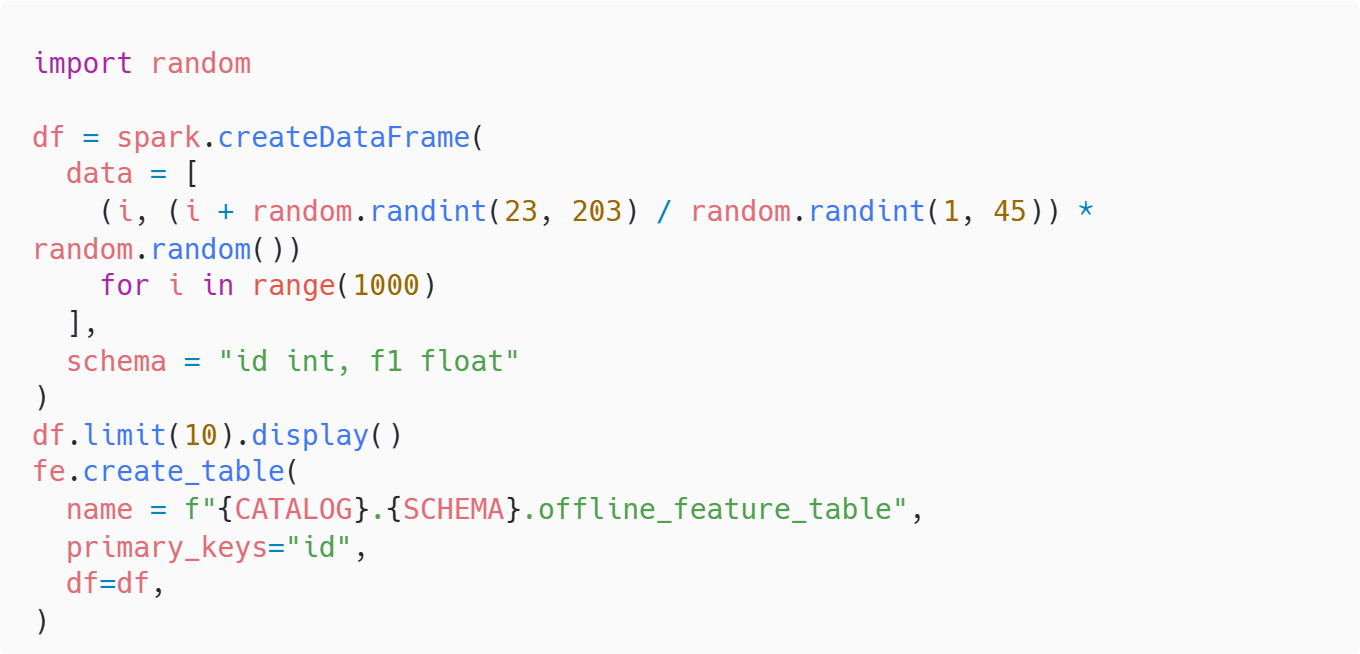
The Dataframe should look something like this once displayed:
| id | f1 |
|
0 |
1.5164 |
|
1 |
5.07906 |
|
2 |
0.669816 |
|
3 |
5.095994 |
|
4 |
0.115651 |
|
5 |
5.431752 |
|
6 |
1.130078 |
|
7 |
5.533181 |
|
8 |
3.497762 |
|
9 |
11.9405 |
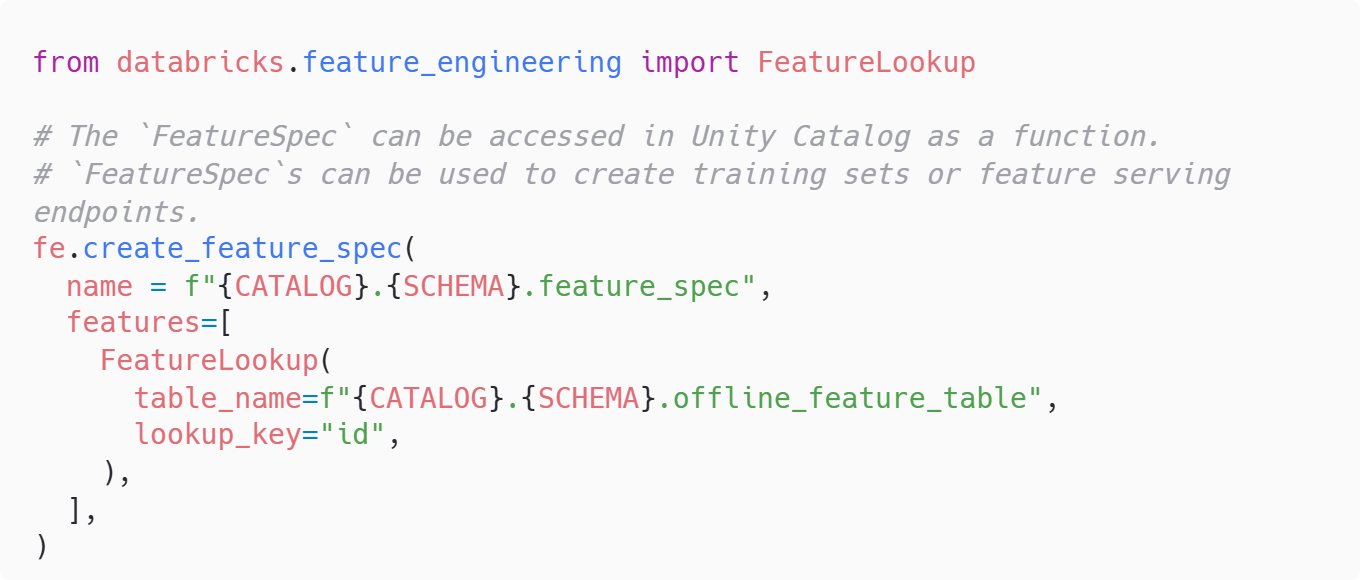
Once the table exists, we define a FeatureSpec. The spec references the table and declares how features are looked up. Here, by id. Specs give you a tidy, reusable definition you can point both training jobs and serving endpoints at. Because the spec is stored in Unity Catalog, other users can discover and reuse it without needing to know the raw table paths or column details. It’s a small step that pays off massively in keeping things standardised.
Now it’s time to create the online store backed by Lakebase. We call fe.create_online_store(...) with a name and a capacity unit, starting with CU_1. Capacity is about throughput and latency requirements; you can scale up to CU_2, CU_4, or CU_8 as traffic grows. The store is fully managed, so you don’t have to worry about provisioning or patching a database. Pick a capacity, let the platform do the heavy lifting, and adjust later based on real-world load tests.

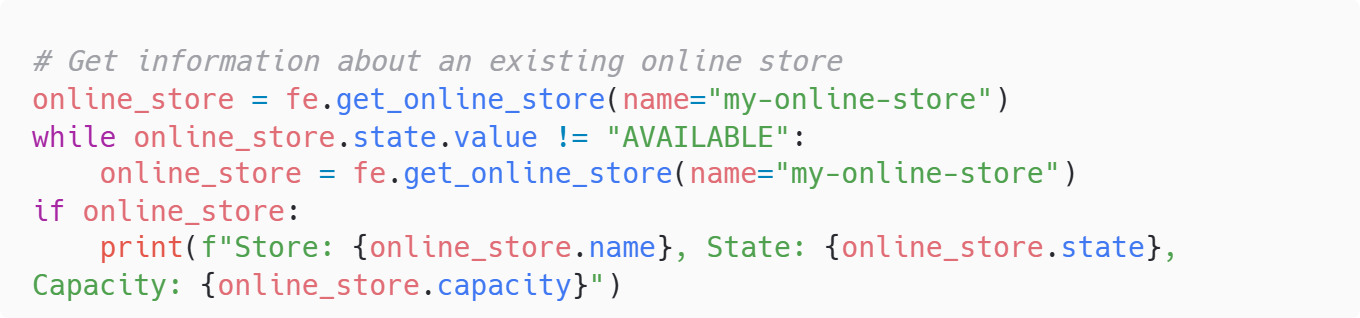
After requesting the store, the notebook polls its state until it becomes AVAILABLE. It’s worth waiting here rather than rushing ahead. Publishing features to a store that’s still initialising inevitably causes errors. If you’re automating this in a pipeline, add a timeout and a couple of retries so it doesn’t hang forever if something goes awry.
Before we publish anything, we enable Delta Change Data Feed (CDF) on the offline feature table with a quick ALTER TABLE statement. CDF is what allows changes in the offline table (new rows, updates, deletes, etc) to be tracked efficiently and reflected in the online table. Without this, you’d end up cobbling together your own sync logic. With CDF on, Lakebase can keep the online copy up to date with minimal fuss.

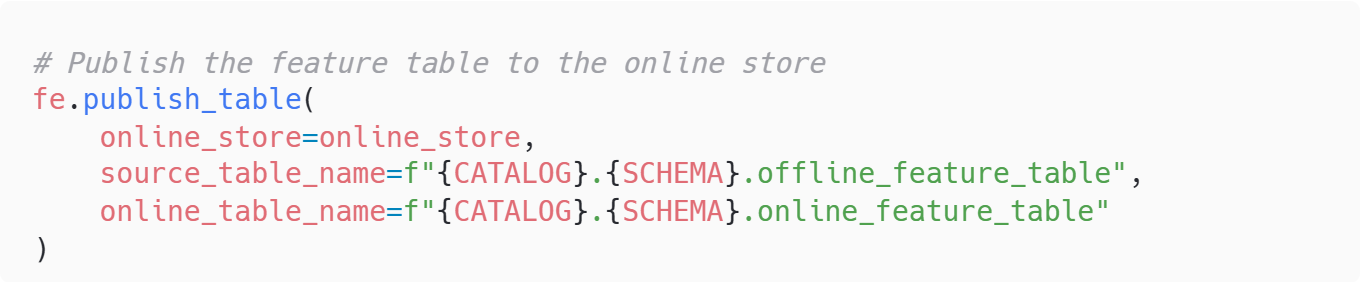
Publishing the offline table into the online store is a single call: fe.publish_table(...). You pass the store, the source offline table, and the name you want the online table to have. From here on, updates to the offline table will flow through to the online one, which is exactly what you want for real-time inference. Fresh features, ready when your endpoint asks for them!
The section then creates a feature serving endpoint. The config sets a small workload and enables scale-to-zero, which is handy for controlling costs when the endpoint isn’t being queried. In many setups you’ll point the endpoint at the FeatureSpec rather than directly at the table because specs give you portability and clarity; this example shows both patterns in spirit, but in production it’s cleaner to stick to the spec-centric approach, especially if several tables feed the same logical feature set.
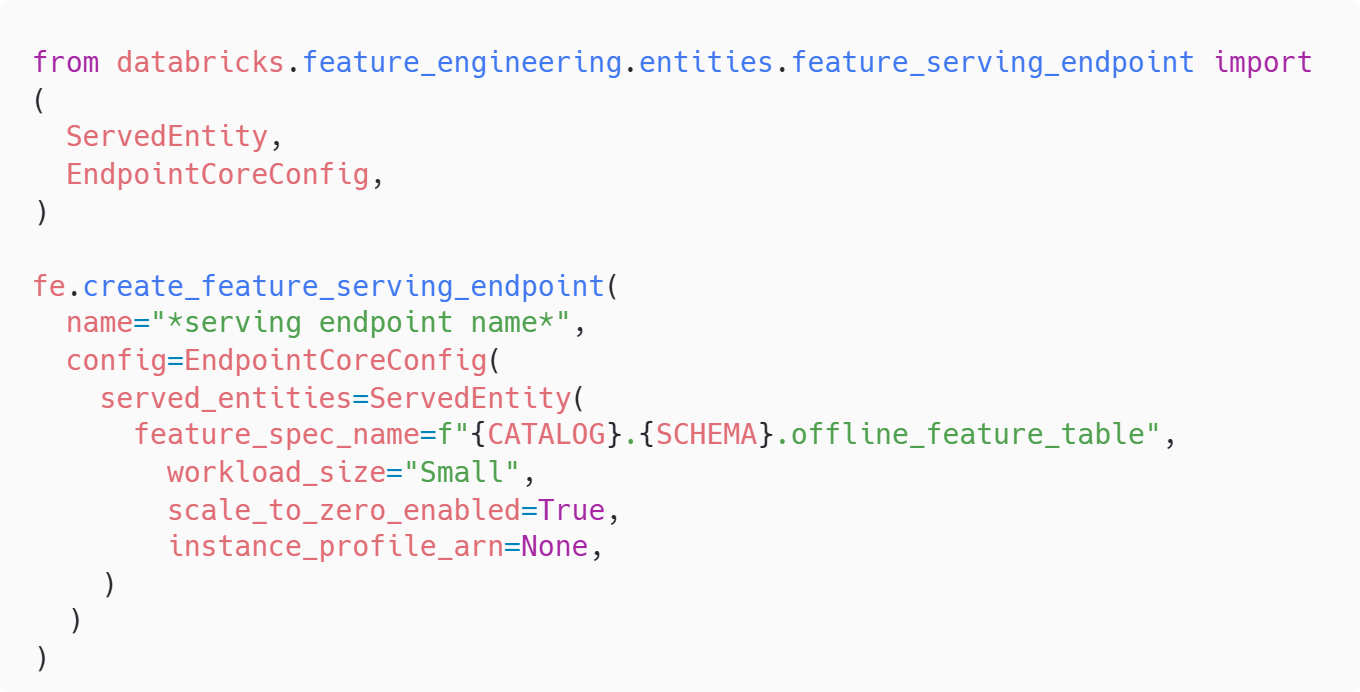
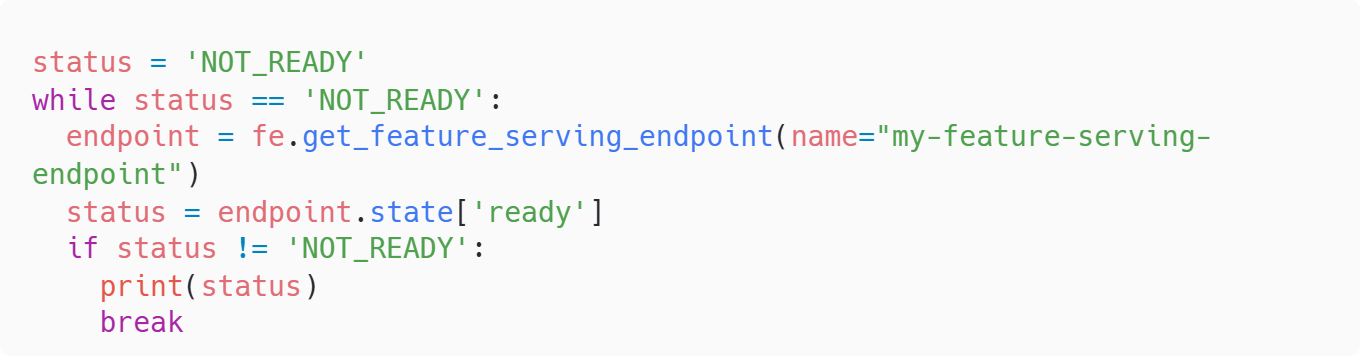
As with the store, we wait until the endpoint reports a READY state before trying it out. Again, if you’re putting this in CI/CD or a scheduled job, add a timeout and sensible error handling. Nothing worse than a job that waits forever and blocks your deployment window.
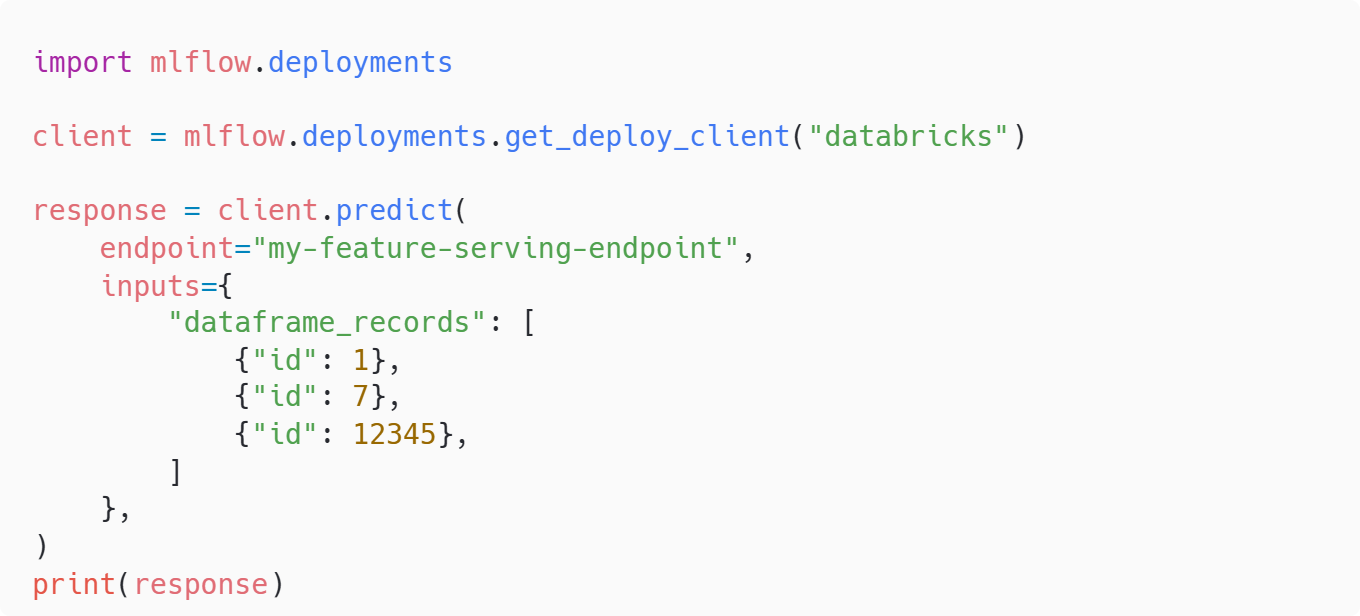
To test the endpoint, we use MLflow Deployments to send a few id values and read back the features. The payload uses dataframe_records, which keeps the format familiar to anyone used to Pandas or Spark. You’ll typically see returned features for keys that exist and nulls or empties for keys that don’t. That’s your cue to add guardrails in client code: treat missing features as a signal to fall back to defaults, short-circuit a request, or log for investigation depending on your app’s needs.
Finally, if the user wished to delete the endpoint, online store, and feature spec. Use the following:

Costing Considerations
Before you dive headfirst into online feature stores, it’s worth talking about cost. Lakebase is a fully managed service, which means you’re paying for convenience, scalability, and low-latency performance but those benefits come with a price tag.
The main cost driver for Lakebase online feature stores is capacity units (CU). When you create an online store, you choose a capacity like CU_1, CU_2, CU_4, or CU_8. Each CU represents a slice of compute and storage optimised for transactional workloads. The higher the CU, the more throughput and lower latency you’ll get but also the higher the cost. For most proof-of-concept or low-traffic scenarios, CU_1 is plenty. If you’re serving thousands of requests per second in production, you’ll need to scale up.
On top of the online store, there’s the feature serving endpoint. Endpoints incur compute costs based on workload size (Small, Medium, Large) and whether you enable scale-to-zero. Scale-to-zero is a great way to save money when the endpoint isn’t being queried, Databricks will spin it down and bring it back up when needed. If you leave it running 24/7, expect higher costs.
Don’t forget storage costs for your Delta tables and Lakebase tables. While these are usually minor compared to compute, they can add up if you’re storing millions of features or keeping long retention windows.
A few tips to keep costs under control:
- Start small: use CU_1 and a Small endpoint for initial testing.
- Enable scale-to-zero on endpoints wherever possible.
- Monitor usage and latency, don’t over-provision unless you need to.
- Clean up unused stores and endpoints after demos or experiments.
Conclusion
Online feature stores are a game-changer for real-time machine learning, and with Lakebase, Databricks has made them easier and faster than ever. By combining low-latency transactions with automatic syncing to Delta tables, Lakebase removes the complexity of ETL and manual updates, giving you a fully managed solution that scales with your needs. Whether you’re building a proof of concept or deploying production-grade endpoints, the process is straightforward: define your offline features, publish them to Lakebase, and serve them through an endpoint. Keep an eye on capacity and cost, start small, and scale as demand grows. With this setup, you can deliver fresh, reliable features to your models in real time, without the operational headaches.
If you have any questions or want to pick our brains on Lakebase further, feel free to contact us.